Reviewer Profile
What is the Reviewer Profile?
The Reviewer Profile has been developed as a tool to build and support reviewer expertise management. Information gathered from profiles also helps align reviewers with applications' fields of research and strengthens reporting and analytic capabilities.
The Reviewer Profile captures information through a Reviewer Overview and an Expertise Overview. When filling out your Reviewer Profile, we encourage you to select items based on your ability and willingness to review.
The Reviewer Overview identifies Reviewer Type, which captures your reviewer expertise or perspective, and peer review language ability. Other information captured in this section, that may or may not be applicable, includes:
- First independent appointment
- Funding history
- Peer review experience
- Bibliographic information
The Expertise Overview captures expertise through various categories, namely:
- Research Themes
- CIHR Institutes
- Three expertise descriptor categories:
- Committee Mandates
Your Reviewer Profile may be accessed through ResearchNet. If the Reviewer Profile is not listed in your ResearchNet account, please contact us at college@cihr-irsc.gc.ca. For more details, please consult the How to access the Reviewer Profile and College Profile on ResearchNet page.
Completing your Reviewer Profile
Thank you for taking the time to complete your Reviewer Profile. Your completed Reviewer Profile will support CIHR staff in identifying peer review activities that best match your perspective and expertise. We welcome your feedback on the Reviewer Profile and your experience completing it. Please share with us at college@cihr-irsc.gc.ca.
Reviewer Expertise Types

Based on the perspective(s) you are comfortable and willing to review from, sections of the Reviewer Profile may alternate between mandatory or recommended. Select a perspective below for guidance on which sections to focus on when completing your Reviewer Profile.
Researchers
Researchers
Researchers include reviewers who are independent researchers, such as Academic and Non-Academic Researchers, Clinical Scientists, and Biostatisticians. As a researcher, you will find most sections of the Reviewer Profile are applicable to you.
Step 1: Reviewer Overview

In this step, the following sections are required:
- Reviewer Type: This informs CIHR the viewpoint from which you are able and willing to review. Depending on peer review requirements, CIHR will engage with different types of reviewers. It is important that you select only the perspectives for which you have experience and expertise for peer review.
- Peer Review Language Ability: Identify in which languages (English or French) you can conduct reviews. As a peer reviewer, you will be assigned applications to review in the language(s) you select on your Profile. While you are required to understand the content of the application in your selected language(s), you may write your review in either official language.
Academic researchers should also provide details of their First Independent Appointment.
Step 2: Expertise Overview

All sections listed here are mandatory and assist CIHR in matching your expertise to peer review opportunities. In each section you will confirm your level of expertise (Advanced or Intermediate). Certain sections marked with an asterisk (*) contain an additional level of expertise (Primary) to identify your main area of research/expertise:
- Research Themes*
- CIHR Institutes
- Three expertise descriptor categories:
- Committee Mandates
Step 3: Review My Profile
In this step, you may see warnings which highlight an incomplete section or mandatory field, such as the ones listed on this image:

Long description
CIHR many not be able to effectively match you to relevant applications. Please review the following alert(s).
- A primary Theme is required.
- A primary Area of Science is required.
- An advanced Method/Approach is required.
- An advanced Study Population/Experimental System is required.
- No committee mandate alignment has been identified.
Clicking on a warning will bring you to that section and allow you to update your information. Simply disregard warnings for any sections you intentionally skipped. Rest assured these warnings will not affect your saved information.
Reviewer Profile Examples
Theme 1: Biomedical Research
Background: My research focuses on better understanding the cellular and molecular mechanisms that underlie different neuromuscular disorders. My laboratory employs transgenic mouse models to switch the expression of critical cell signaling molecules on and off.
Theme: My primary theme is Biomedical Research.
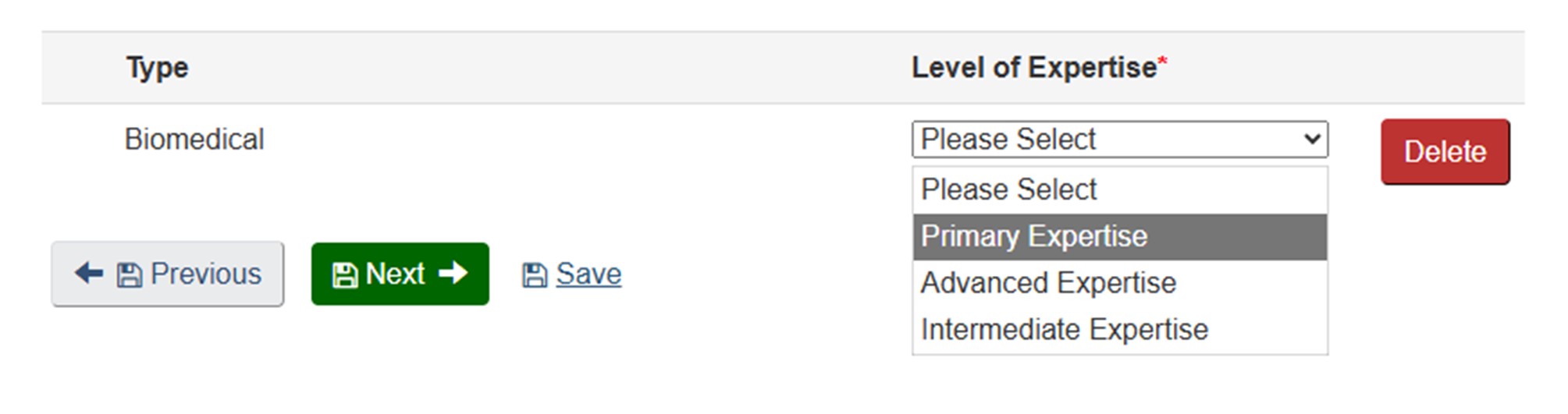
Long description
The image shows a section of a web form related to expertise selection. At the top, there is a table with two columns labeled:
- Type
- Level of Expertise* (with an asterisk indicating a required field)
Under the Type column, the word Biomedical is displayed. Under the Level of Expertise column, there is a dropdown menu currently expanded, showing the following options:
- Please Select
- Primary Expertise (highlighted in gray)
- Advanced Expertise
- Intermediate Expertise
To the right of the dropdown menu, there is a red rectangular button labeled Delete.
Below the table, there are three navigation and action buttons:
- A gray button labeled Previous with a left arrow icon.
- A green button labeled Next with a right arrow icon.
- A blue text link labeled Save.
Institute: My expertise aligns best with the institutes of Neurosciences, Mental Health and Addiction, Genetics, and Musculoskeletal Health and Arthritis
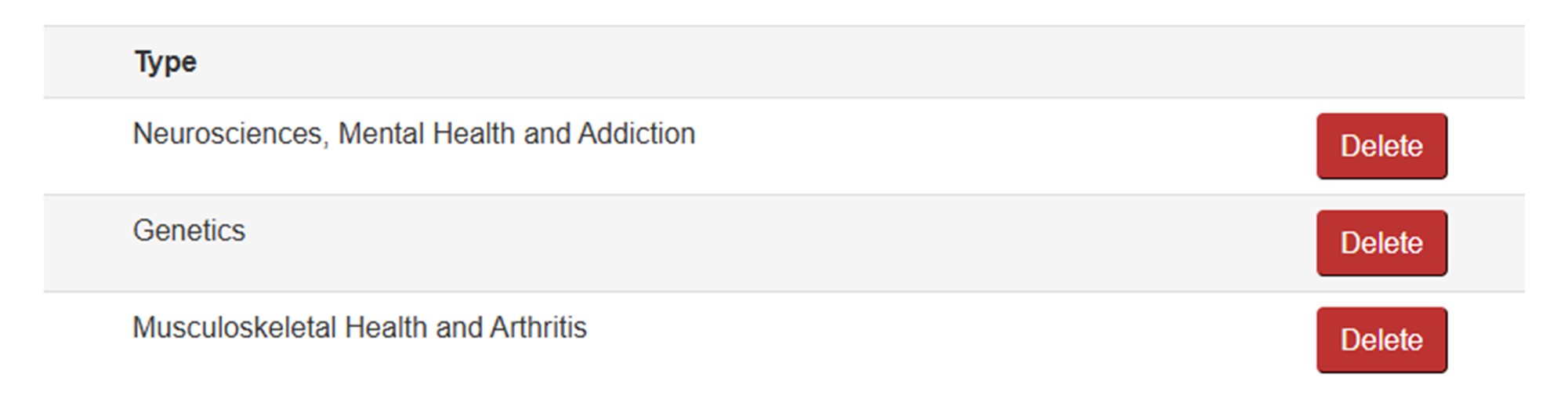
Long description
The image shows a section of a form listing selected expertise types. The layout consists of two rows under the heading "Type", each representing a specific research area:
- Neurosciences, Mental Health and Addiction
- Genetics
- Musculoskeletal Health and Arthritis
To the right of each entry, there is a red "Delete" button.
Area of Science: My Primary Area of Science is Neurogenesis, Neurodifferentiation, and Plasticity. I have Advanced expertise in Sensory and Motor Neurosciences, Skeletal Muscle Biology and Physiology, Molecular and Functional Genetics, and Cell Signaling.
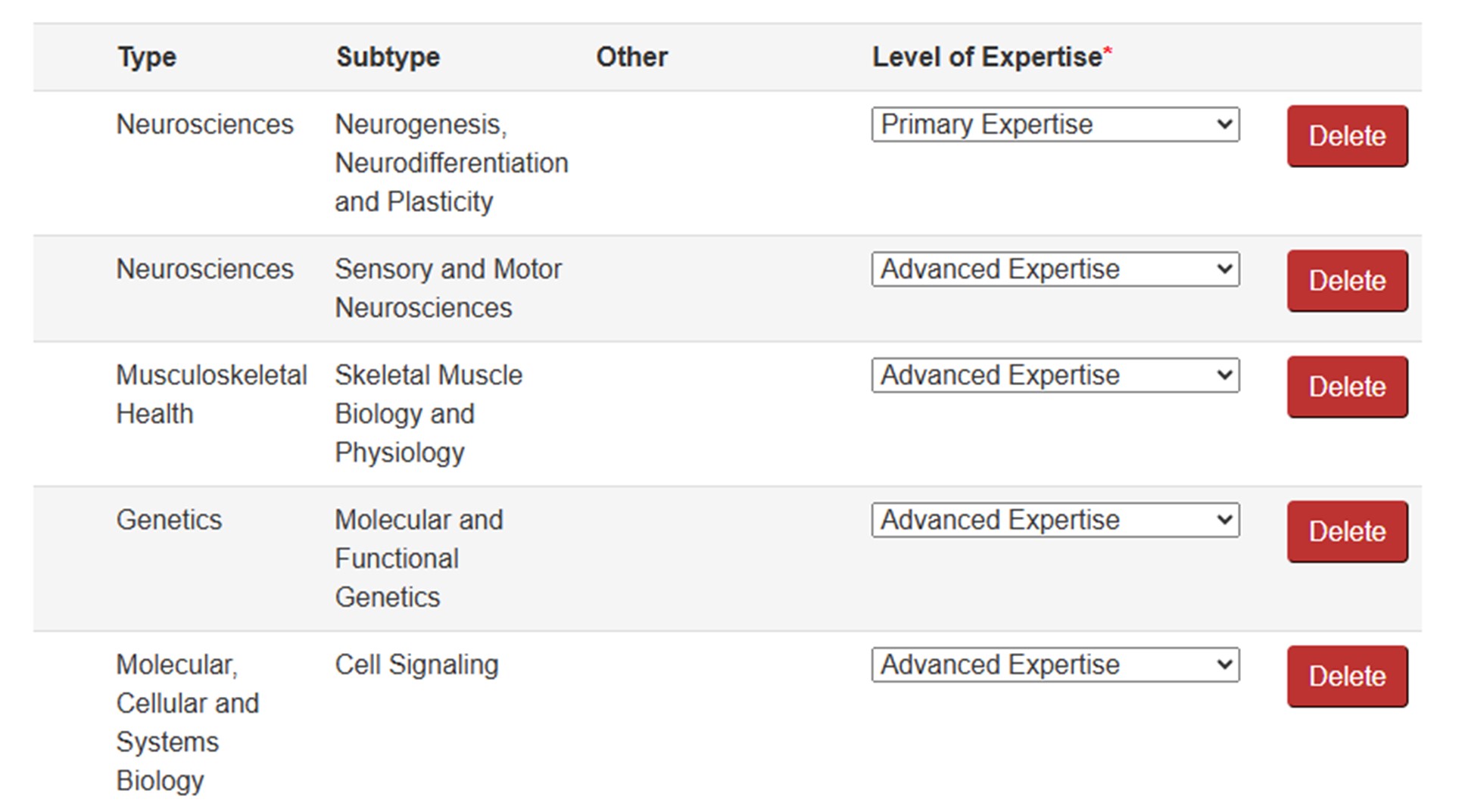
Long description
The image shows a section of a form that lists multiple expertise entries with corresponding details. The layout is organized into four columns: Type, Subtype, Other, and Level of Expertise, followed by a Delete button for each row. Here are the entries:
Row 1
- Type: Neurosciences
- Subtype: Neurogenesis, Neurodifferentiation and Plasticity
- Other: (blank)
- Level of Expertise: Primary Expertise (selected from a dropdown menu)
Row 2
- Type: Neurosciences
- Subtype: Sensory and Motor Neurosciences
- Other: (blank)
- Level of Expertise: Advanced Expertise (selected)
Row 3
- Type: Musculoskeletal Health
- Subtype: Skeletal Muscle Biology and Physiology
- Other: (blank)
- Level of Expertise: Advanced Expertise (selected)
Row 4
- Type: Genetics
- Subtype: Molecular and Functional Genetics
- Other: (blank)
- Level of Expertise: Advanced Expertise (selected)
Row 5
- Type: Molecular, Cellular and Systems Biology
- Subtype: Cell Signaling
- Other: (blank)
- Level of Expertise: Advanced Expertise (selected)
Methods/Approaches: I have Advanced Expertise in CRISPR/Cas, Transgenics and Knockouts, and Gene Targeting. I have Intermediate Expertise in Immunocytochemistry, and Immunohistochemistry.
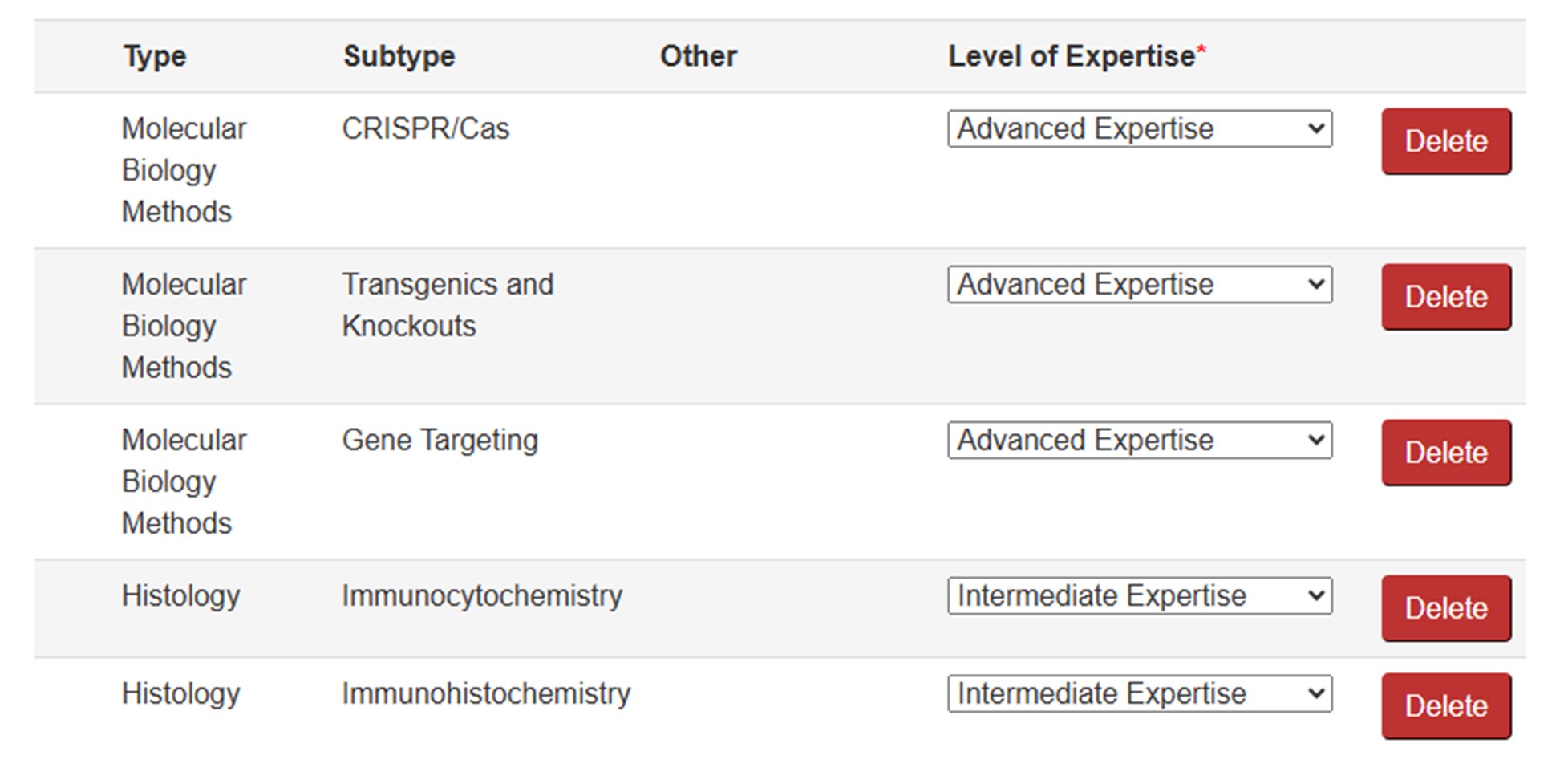
Long description
The image shows a section of a form that lists multiple expertise entries with corresponding details. The layout is organized into four columns: Type, Subtype, Other, and Level of Expertise, followed by a Delete button for each row. Here are the entries:
Row 1
- Type: Molecular Biology Methods
- Subtype: CRISPR/Cas
- Other: (blank)
- Level of Expertise: Advanced Expertise (selected from a dropdown menu)
Row 2
- Type: Molecular Biology Methods
- Subtype: Transgenics and Knockouts
- Other: (blank)
- Level of Expertise: Advanced Expertise (selected)
Row 3
- Type: Molecular Biology Methods
- Subtype: Gene Targeting
- Other: (blank)
- Level of Expertise: Advanced Expertise (selected)
Row 4
- Type: Histology
- Subtype: Immunocytochemistry
- Other: (blank)
- Level of Expertise: Intermediate Expertise (selected)
Row 5
- Type: Histology
- Subtype: Immunohistochemistry
- Other: (blank)
- Level of Expertise: Intermediate Expertise (selected)
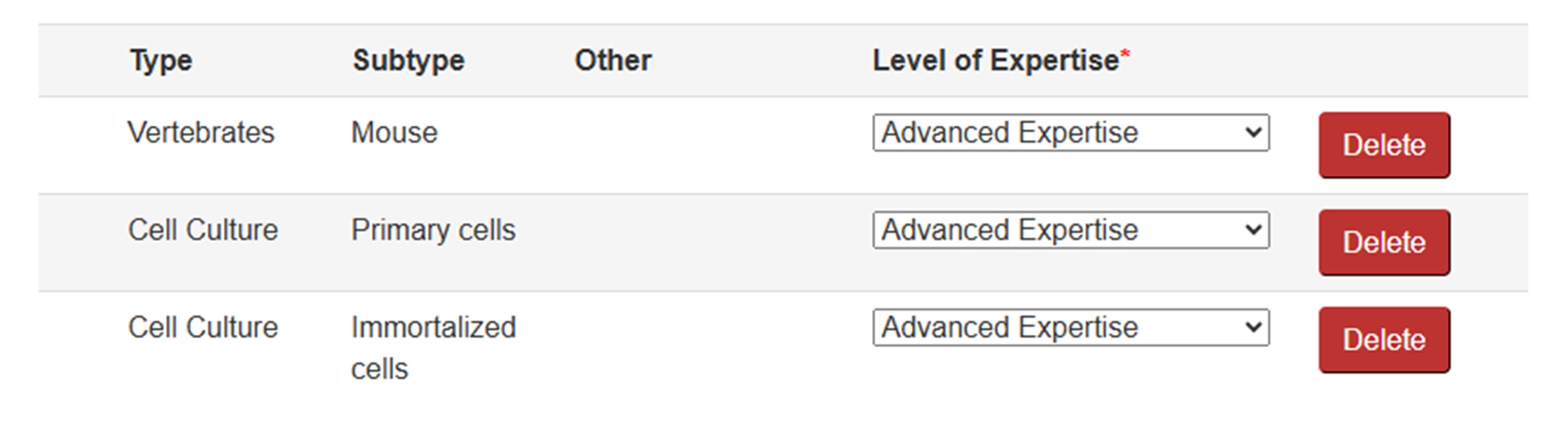
Study Populations/Experimental Systems: I have Advanced Expertise in Mouse, Primary cells, and Immortalized cells.
Long description
The image shows a section of a form that lists multiple expertise entries with corresponding details. The layout is organized into four columns: Type, Subtype, Other, and Level of Expertise, followed by a Delete button for each row. Here are the entries:
Row 1
- Type: Vertebrates
- Subtype: Mouse
- Other: (blank)
- Level of Expertise: Advanced Expertise (selected from a dropdown menu)
Row 2
- Type: Cell Culture
- Subtype: Primary cells
- Other: (blank)
- Level of Expertise: Advanced Expertise (selected)
Row 3
- Type: Cell Culture
- Subtype: Immortalized cells
- Other: (blank)
- Level of Expertise: Advanced Expertise (selected)
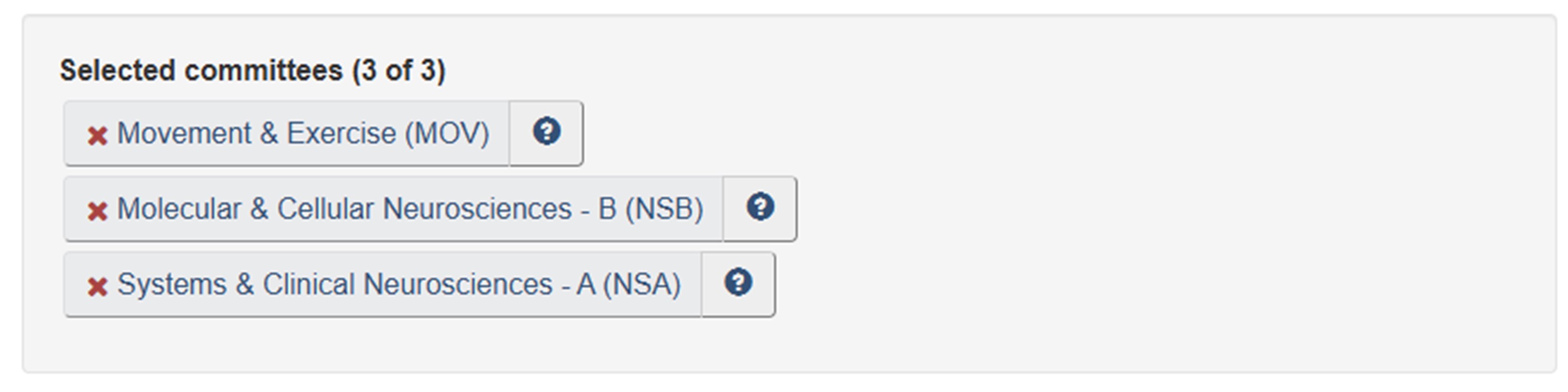
Committee Mandates: Movement and Exercise (MOV), Molecular and Cellular Neurosciences (NSB), and Systems and Circuits Neurosciences (NSA) best reflect my areas of research.
Long description
The image shows a section of a webpage titled "Selected committees (3 of 3)", indicating that three committees have been chosen. Below the heading, there are three rectangular buttons stacked vertically, each representing a selected committee. Each button has a light gray background and contains the committee name along with an abbreviation in parentheses. To the left of each committee name is a red "X" icon, which likely serves as a remove or delete option. To the right of each name is a small blue circular icon with a white question mark, suggesting that it provides additional information or help.
The three selected committees are:
- Movement & Exercise (MOV)
- Molecular & Cellular Neurosciences - B (NSB)
- Systems & Clinical Neurosciences - A (NSA)
Theme 2: Clinical Research
Background: I am a Clinical Researcher. My research uses next generation sequencing technologies to develop genetic profiles for different forms of childhood cancer.
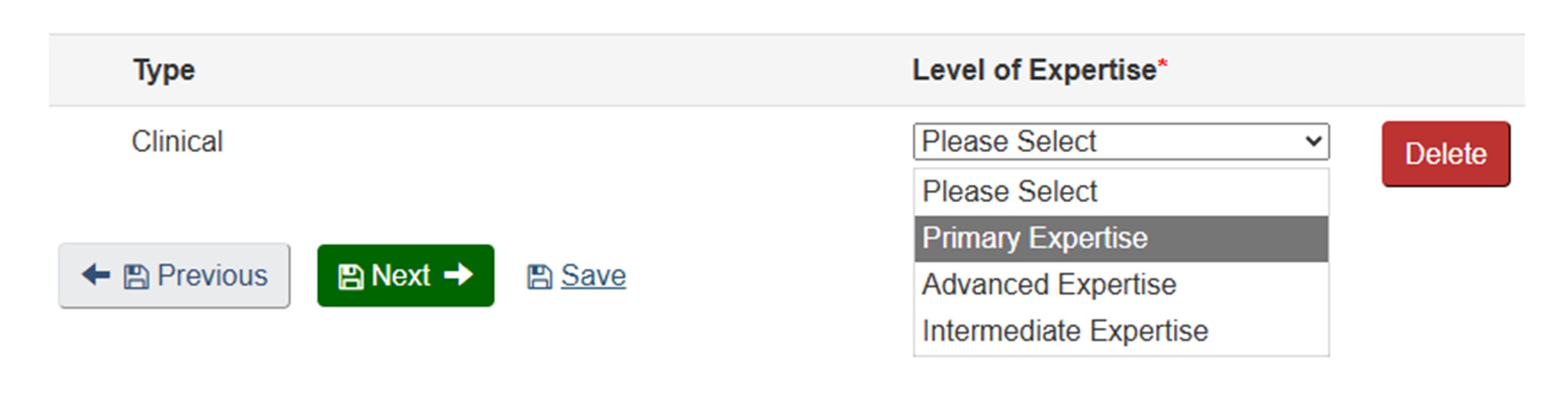
Theme: My primary theme is Clinical Research.
Long description
The image shows a section of a web form related to expertise selection. At the top, there is a table with two columns labeled:
- Type
- Level of Expertise* (with an asterisk indicating a required field)
Under the Type column, the word Clinical is displayed. Under the Level of Expertise column, there is a dropdown menu currently expanded, showing the following options:
- Please Select
- Primary Expertise (highlighted in gray)
- Advanced Expertise
- Intermediate Expertise
To the right of the dropdown menu, there is a red rectangular button labeled Delete.
Below the table, there are three navigation and action buttons:
- A gray button labeled Previous with a left arrow icon.
- A green button labeled Next with a right arrow icon.
- A blue text link labeled Save.
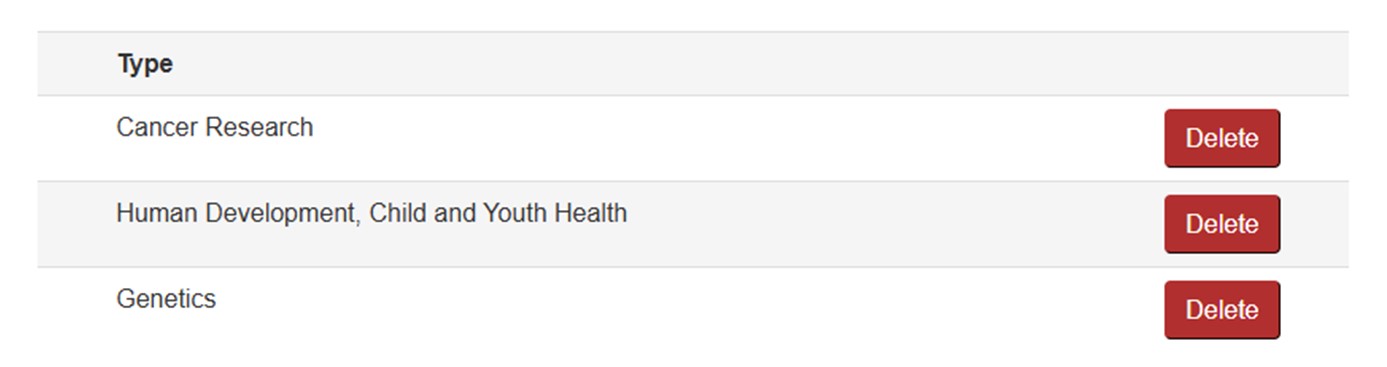
Institute: My expertise aligns best with the Institutes of Cancer Research, Human Development, Child and Youth Health, and Genetics.
Long description
The image shows a section of a form listing selected expertise types. The layout consists of two rows under the heading "Type", each representing a specific research area:
- Cancer Research
- Human Development, Child and Youth Health
- Genetics
To the right of each entry, there is a red "Delete" button.
Area of Science: My Primary Area of Science as Clinical Oncology. I have Advanced expertise in Cancer Progression and Metastasis, Cancer Drug Development and Therapeutics, and Molecular and Functional Genetics. I have Intermediate expertise in Genomics, Transcriptomics and Proteomics.
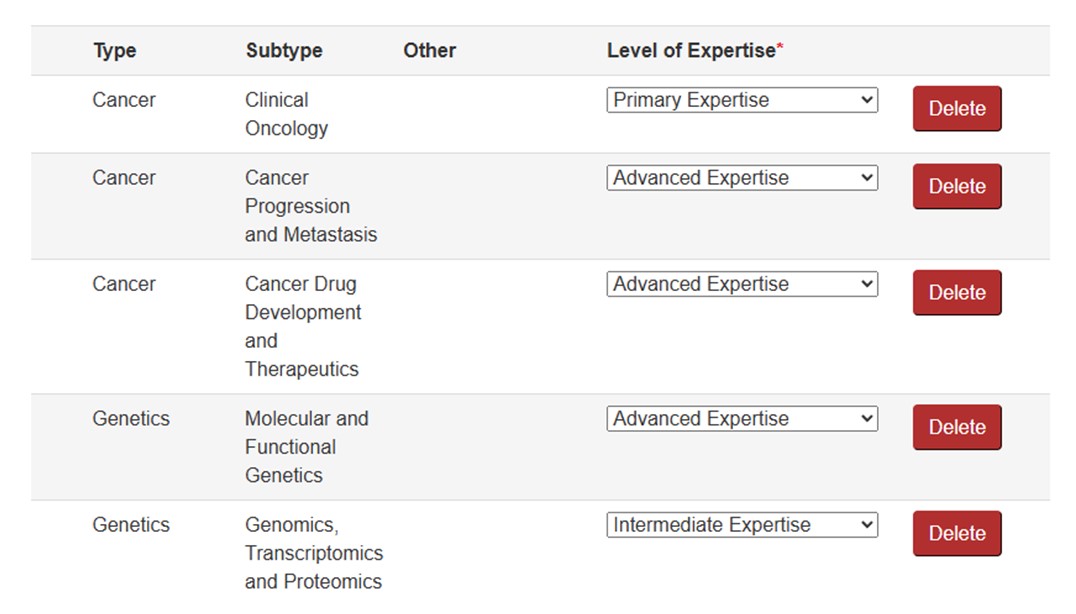
Long description
The image shows a section of a form that lists multiple expertise entries with corresponding details. The layout is organized into four columns: Type, Subtype, Other, and Level of Expertise, followed by a Delete button for each row. Here are the entries:
Row 1
- Type: Cancer
- Subtype: Clinical Oncology
- Other: (blank)
- Level of Expertise: Primary Expertise (selected from a dropdown menu)
Row 2
- Type: Cancer
- Subtype: Cancer Progression and Metastasis
- Other: (blank)
- Level of Expertise: Advanced Expertise (selected)
Row 3
- Type: Cancer
- Subtype: Cancer Drug Development and Therapeutics
- Other: (blank)
- Level of Expertise: Advanced Expertise (selected)
Row 4
- Type: Genetics
- Subtype: Molecular and Functional Genetics
- Other: (blank)
- Level of Expertise: Advanced Expertise (selected)
Row 5
- Type: Genetics
- Subtype: Genomics, Transcriptomics and Proteomics
- Other: (blank)
- Level of Expertise: Intermediate Expertise (selected)
Methods/Approaches: I have Advanced expertise in Predictive and Prognostic biomarkers, Clinical Research, and Genetic Testing. I have Intermediate expertise in RNA and DNA Sequencing and Technologies.
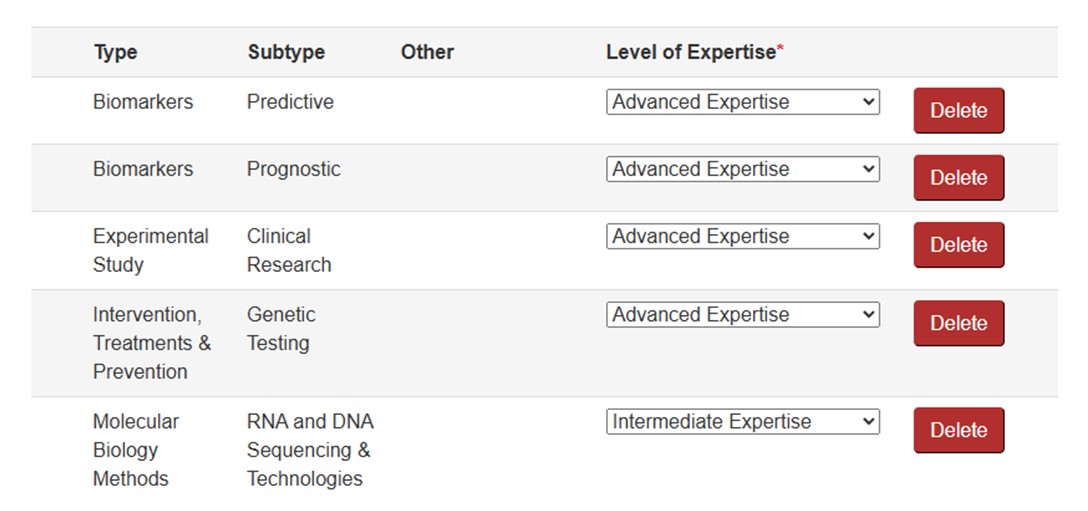
Long description
The image shows a section of a form that lists multiple expertise entries with corresponding details. The layout is organized into four columns: Type, Subtype, Other, and Level of Expertise, followed by a Delete button for each row. Here are the entries:
Row 1
- Type: Biomarkers
- Subtype: Predictive
- Other: (blank)
- Level of Expertise: Advanced Expertise (selected from a dropdown menu)
Row 2
- Type: Biomarkers
- Subtype: Prognostic
- Other: (blank)
- Level of Expertise: Advanced Expertise (selected)
Row 3
- Type: Experimental Study
- Subtype: Clinical Research
- Other: (blank)
- Level of Expertise: Advanced Expertise (selected)
Row 4
- Type: Intervention, Treatments & Prevention
- Subtype: Genetic Testing
- Other: (blank)
- Level of Expertise: Advanced Expertise (selected)
Row 5
- Type: Molecular Biology Methods
- Subtype: RNA and DNA Sequencing & Technologies
- Other: (blank)
- Level of Expertise: Intermediate Expertise (selected)
Study Populations/Experimental Systems: I have Advanced expertise in Children and Youth and Intermediate expertise in Cancer.
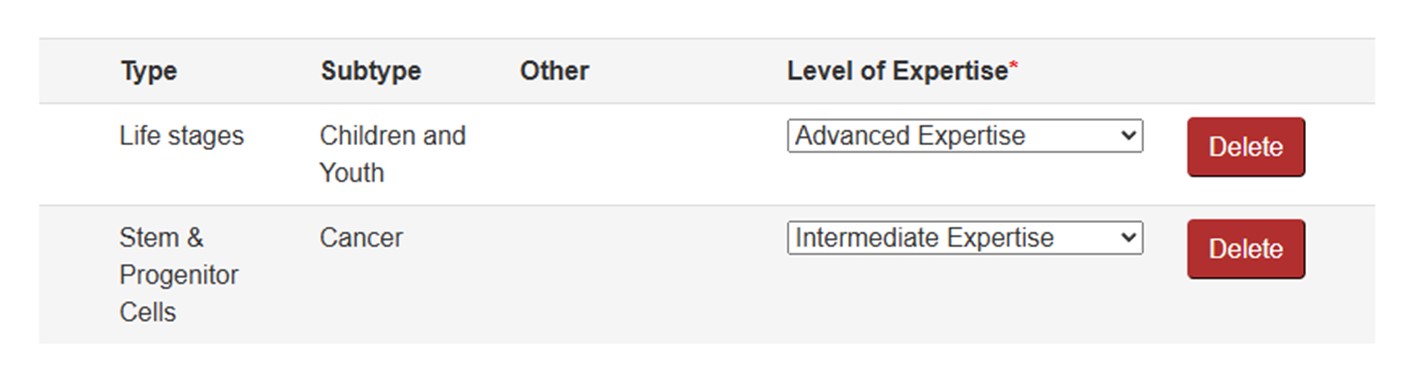
Long description
The image shows a section of a form that lists multiple expertise entries with corresponding details. The layout is organized into four columns: Type, Subtype, Other, and Level of Expertise, followed by a Delete button for each row. Here are the entries:
Row 1
- Type: Life stages
- Subtype: Children and Youth
- Other: (blank)
- Level of Expertise: Advanced Expertise (selected from a dropdown menu)
Row 2
- Type: Stem & Progenitor Cells
- Subtype: Cancer
- Other: (blank)
- Level of Expertise: Intermediate Expertise (selected)
Committee Mandates: Cancer Biology and Therapeutics (CBT) and Cancer Progression and Therapeutics (CPT) best reflect my areas of research.

Long description
The image shows a section of a webpage titled "Selected committees (2 of 3)", indicating that two committees have been chosen. Below the heading, there are two rectangular buttons stacked vertically, each representing a selected committee. Each button has a light gray background and contains the committee name along with an abbreviation in parentheses. To the left of each committee name is a red "X" icon, which likely serves as a remove or delete option. To the right of each name is a small blue circular icon with a white question mark, suggesting that it provides additional information or help.
The two selected committees are:
- Cancer Biology & Therapeutics (CBT)
- Cancer Progression & Therapeutics (CPT)
Theme 3: Health Services Research
Background: I am a Health Services Researcher. My research uses health services research methods to study access to care in vulnerable populations.
Theme: My primary theme is Health Services and Systems.
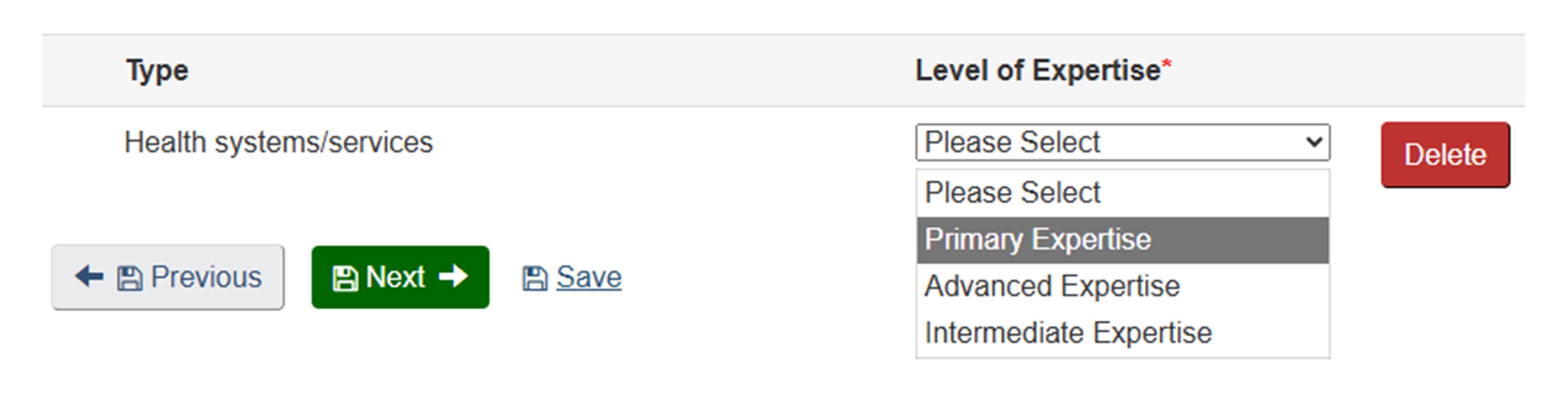
Long description
The image shows a section of a web form related to expertise selection. At the top, there is a table with two columns labeled:
- Type
- Level of Expertise* (with an asterisk indicating a required field)
Under the Type column, the words Health systems/services are displayed. Under the Level of Expertise column, there is a dropdown menu currently expanded, showing the following options:
- Please Select
- Primary Expertise (highlighted in gray)
- Advanced Expertise
- Intermediate Expertise
To the right of the dropdown menu, there is a red rectangular button labeled Delete.
Below the table, there are three navigation and action buttons:
- A gray button labeled Previous with a left arrow icon.
- A green button labeled Next with a right arrow icon.
- A blue text link labeled Save.
Institute: My expertise aligns best with the Institutes of Health Services and Policy Research, and Indigenous Peoples' Health.
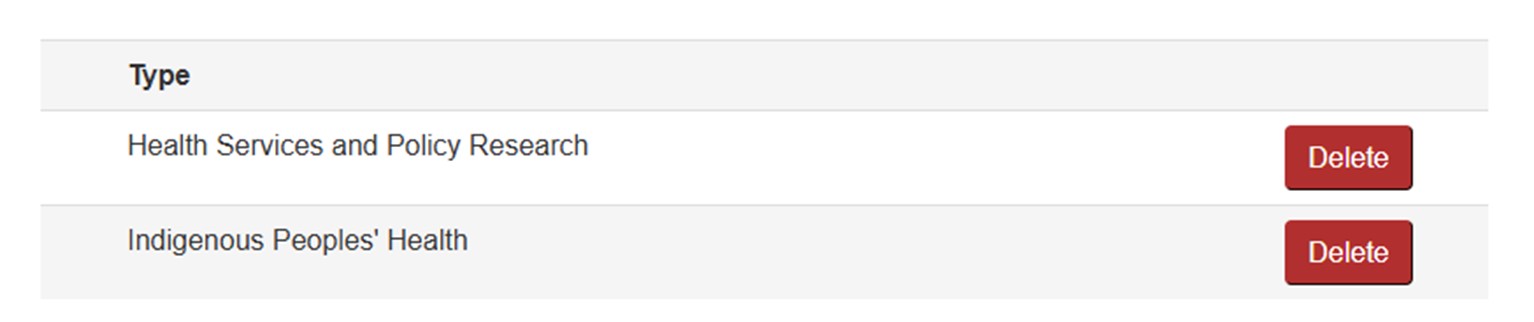
Long description
The image shows a section of a form listing selected expertise types. The layout consists of two rows under the heading "Type", each representing a specific research area:
- Health Services and Policy Research
- Indigenous Peoples' Health
To the right of each entry, there is a red "Delete" button.
Area of Science: My primary Area of Science is Access to Care. I have Advanced expertise in Patient and Citizen Engagement Research, and Indigenous Peoples' Health.
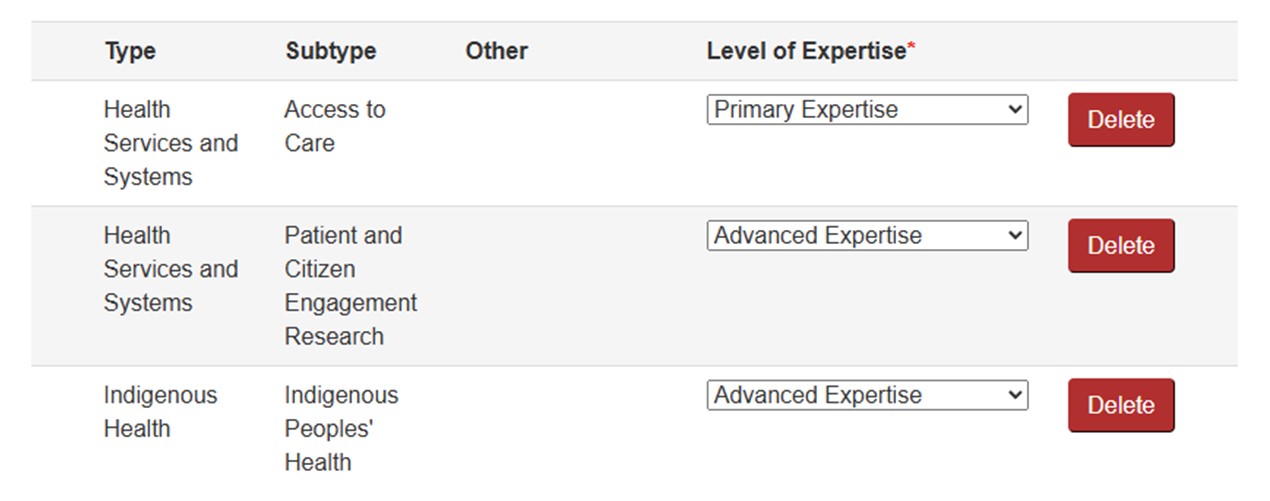
Long description
The image shows a section of a form that lists multiple expertise entries with corresponding details. The layout is organized into four columns: Type, Subtype, Other, and Level of Expertise, followed by a Delete button for each row. Here are the entries:
Row 1
- Type: Health Services and Systems
- Subtype: Access to Care
- Other: (blank)
- Level of Expertise: Primary Expertise (selected from a dropdown menu)
Row 2
- Type: Health Services and Systems
- Subtype: Patient and Citizen Engagement Research
- Other: (blank)
- Level of Expertise: Advanced Expertise (selected)
Row 3
- Type: Indigenous Health
- Subtype: Indigenous Peoples' Health
- Other: (blank)
- Level of Expertise: Advanced Expertise (selected)
Methods/Approaches: I have Advanced expertise in Case Studies, Focus Group, Grounded Theory, Interviews, Narrative Analysis, Questionnaires, and Survey Study.
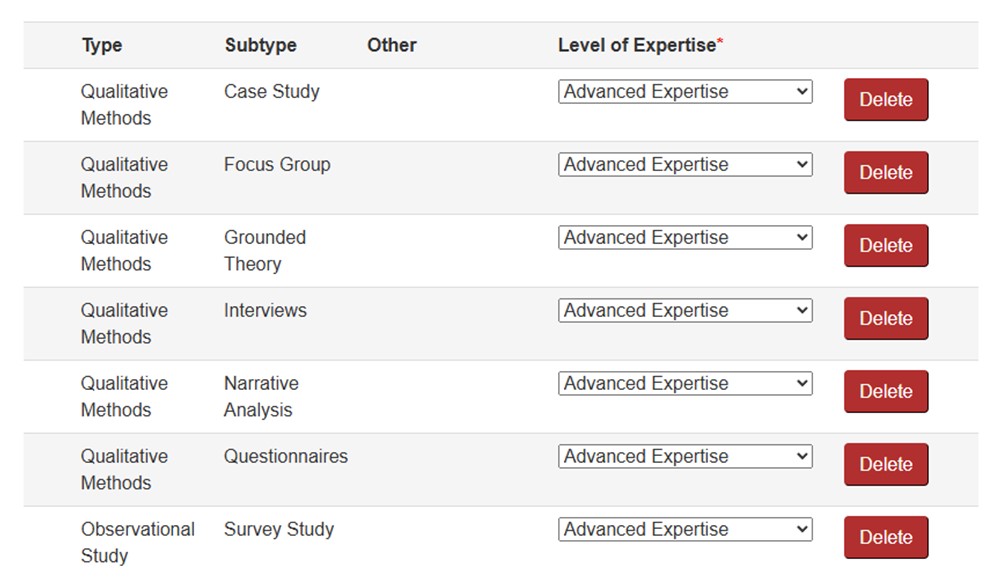
Long description
The image shows a section of a form that lists multiple expertise entries with corresponding details. The layout is organized into four columns: Type, Subtype, Other, and Level of Expertise, followed by a Delete button for each row. Here are the entries:
Row 1
- Type: Qualitative Methods
- Subtype: Case Study
- Other: (blank)
- Level of Expertise: Advanced Expertise (selected from a dropdown menu)
Row 2
- Type: Qualitative Methods
- Subtype: Focus Group
- Other: (blank)
- Level of Expertise: Advanced Expertise (selected)
Row 3
- Type: Qualitative Methods
- Subtype: Grounded Theory
- Other: (blank)
- Level of Expertise: Advanced Expertise (selected)
Row 4
- Type: Qualitative Methods
- Subtype: Interviews
- Other: (blank)
- Level of Expertise: Advanced Expertise (selected)
Row 5
- Type: Qualitative Methods
- Subtype: Narrative Analysis
- Other: (blank)
- Level of Expertise: Advanced Expertise (selected)
Row 6
- Type: Qualitative Methods
- Subtype: Questionnaires
- Other: (blank)
- Level of Expertise: Advanced Expertise (selected)
Row 7
- Type: Observational Study
- Subtype: Survey Study
- Other: (blank)
- Level of Expertise: Advanced Expertise (selected)
Study Populations/Experimental Systems: I have Advanced expertise in Canada/National, Vulnerable People, and First Nations. I have Intermediate expertise in International/Global Health.
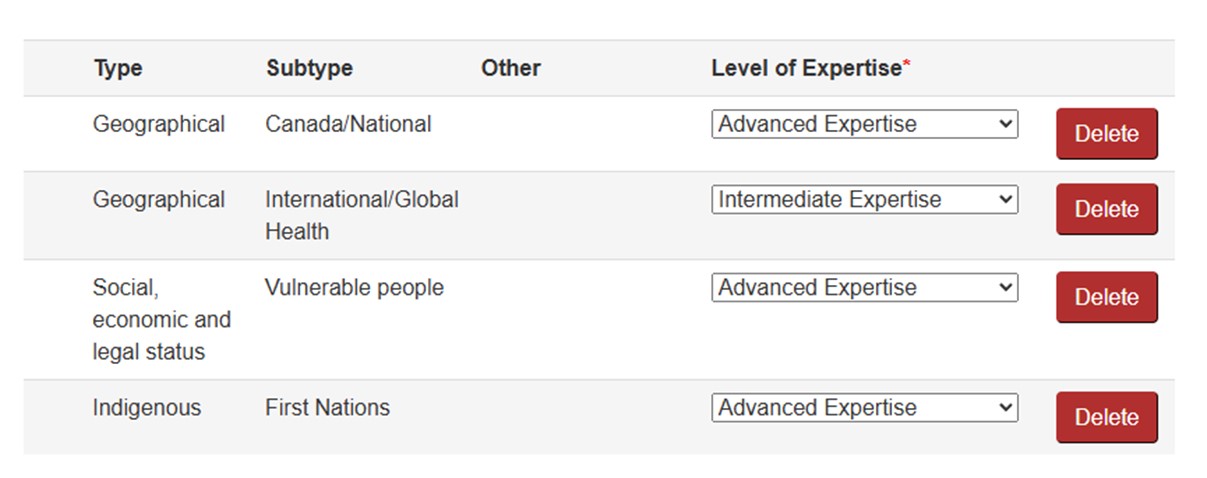
Long description
The image shows a section of a form that lists multiple expertise entries with corresponding details. The layout is organized into four columns: Type, Subtype, Other, and Level of Expertise, followed by a Delete button for each row. Here are the entries:
Row 1
- Type: Geographical
- Subtype: Canada/National
- Other: (blank)
- Level of Expertise: Advanced Expertise (selected from a dropdown menu)
Row 2
- Type: Geographical
- Subtype: International/Global Health
- Other: (blank)
- Level of Expertise: Intermediate Expertise (selected)
Row 3
- Type: Social, economic and legal status
- Subtype: Vulnerable people
- Other: (blank)
- Level of Expertise: Advanced Expertise (selected)
Row 4
- Type: Indigenous
- Subtype: First Nations
- Other: (blank)
- Level of Expertise: Advanced Expertise (selected)
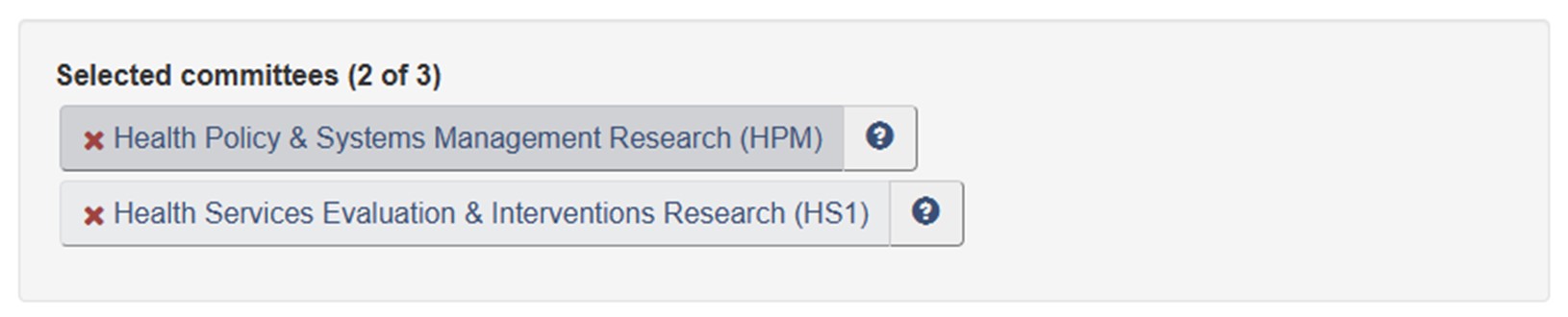
Committee Mandates: Health Policy and Systems Management Research (HPM), and Health Services Evaluation and Interventions Research (HS1) best reflect my main areas of research.
Long description
The image shows a section of a webpage titled "Selected committees (2 of 3)", indicating that two committees have been chosen. Below the heading, there are two rectangular buttons stacked vertically, each representing a selected committee. Each button has a light gray background and contains the committee name along with an abbreviation in parentheses. To the left of each committee name is a red "X" icon, which likely serves as a remove or delete option. To the right of each name is a small blue circular icon with a white question mark, suggesting that it provides additional information or help.
The two selected committees are:
- Health Policy & Systems Management Research (HPM)
- Health Services Evaluation & Interventions Research (HS1)
Theme 4: Social, Cultural, Environmental, and Population Health Research
Background: I am a social, cultural, environmental and population health researcher. My research focuses on the area of knowledge translation and is centered around whether and how evidence informs policy and whether and how policy influences what research gets done. I do this work in public health policies related to chronic disease prevention, health promotion and health equity.
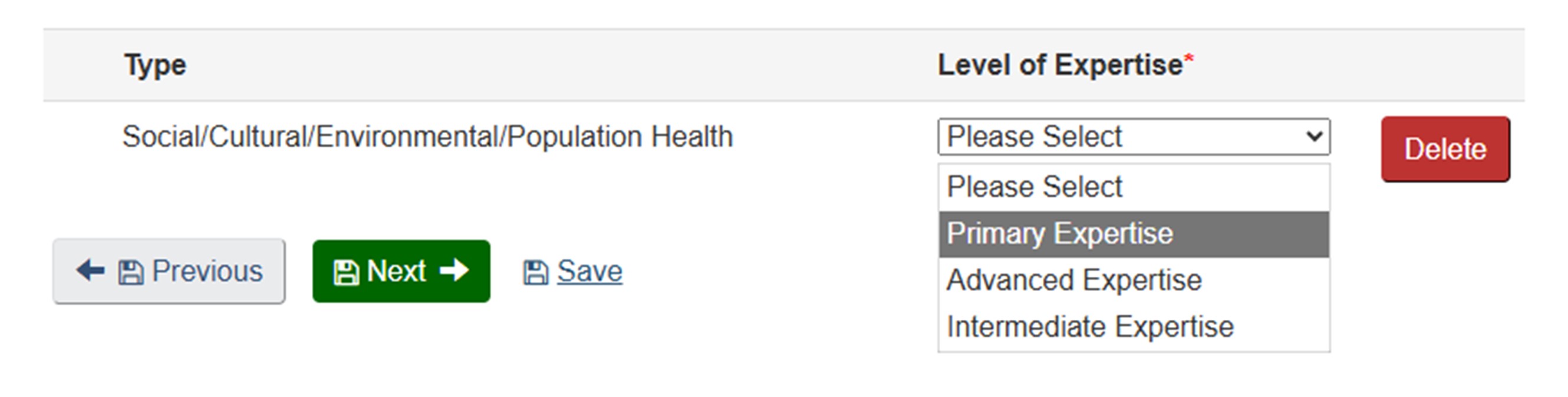
Theme: My primary theme is Social, Cultural, Environmental, and Population Health.
Long description
The image shows a section of a web form related to expertise selection. At the top, there is a table with two columns labeled:
- Type
- Level of Expertise* (with an asterisk indicating a required field)
Under the Type column, the words Social/Cultural/Environmental/Population Health are displayed. Under the Level of Expertise column, there is a dropdown menu currently expanded, showing the following options:
- Please Select
- Primary Expertise (highlighted in gray)
- Advanced Expertise
- Intermediate Expertise
To the right of the dropdown menu, there is a red rectangular button labeled Delete.
Below the table, there are three navigation and action buttons:
- A gray button labeled Previous with a left arrow icon.
- A green button labeled Next with a right arrow icon.
- A blue text link labeled Save.
Institute: My expertise aligns best with the Institute of Population and Public Health.

Long description
The image shows a section of a form listing selected expertise types. The layout consists of one row under the heading "Type", representing a specific research area:
Population and Public Health
To the right of this entry, there is a red "Delete" button.
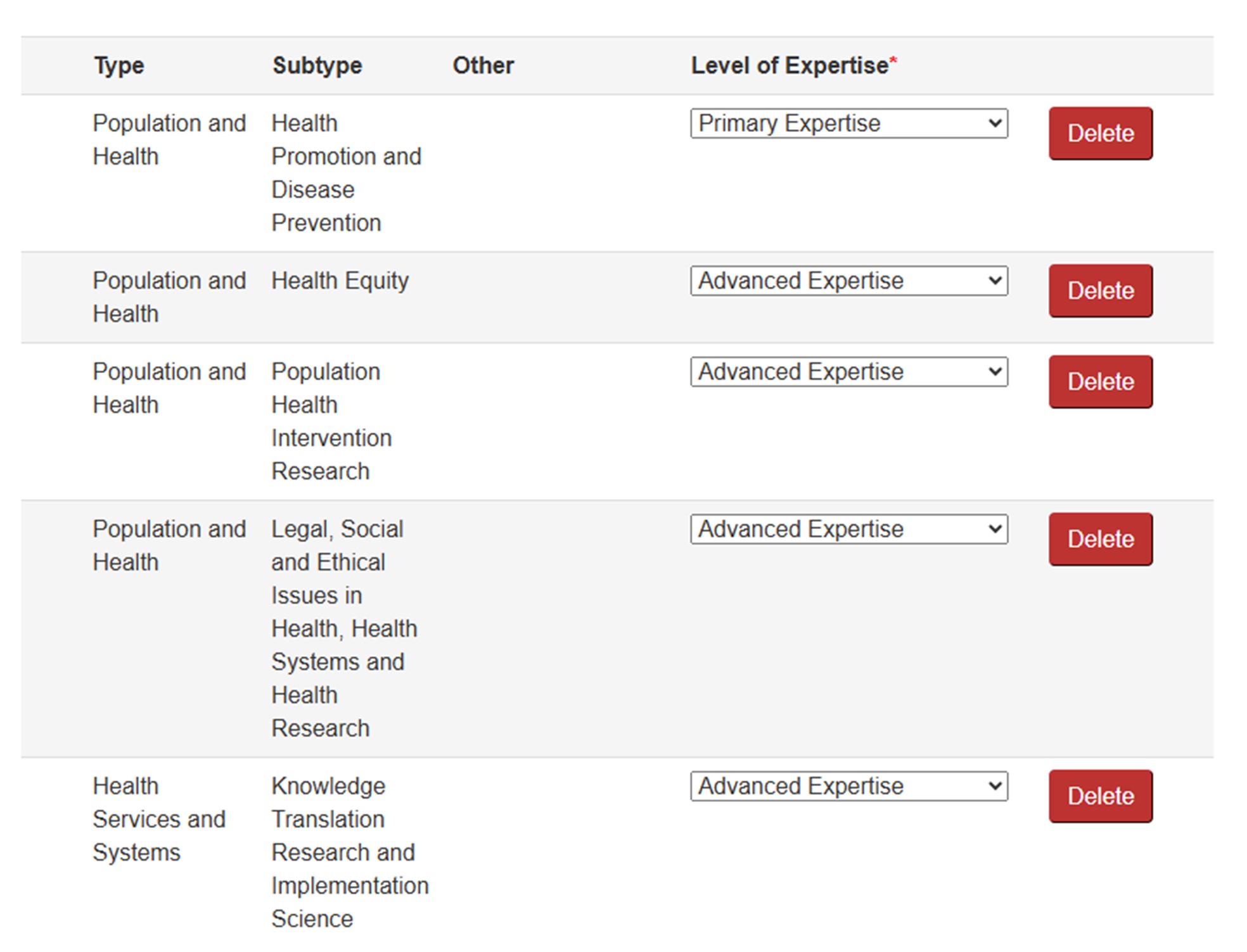
Area of Science: My Primary Area of Science is Health Promotion and Disease Prevention. I have Advanced expertise in Health Equity, Population Health Intervention Research, Legal, Social and Ethical Issues in Health, Health Systems and Health Research, and Knowledge Translation Research and Implementation Science.
Long description
The image shows a section of a form that lists multiple expertise entries with corresponding details. The layout is organized into four columns: Type, Subtype, Other, and Level of Expertise, followed by a Delete button for each row. Here are the entries:
Row 1
- Type: Population and Health
- Subtype: Health Promotion and Disease Prevention
- Other: (blank)
- Level of Expertise: Primary Expertise (selected from a dropdown menu)
Row 2
- Type: Population and Health
- Subtype: Health Equity
- Other: (blank)
- Level of Expertise: Advanced Expertise (selected)
Row 3
- Type: Population and Health
- Subtype: Population Health Intervention Research
- Other: (blank)
- Level of Expertise: Advanced Expertise (selected)
Row 4
- Type: Population and Health
- Subtype: Legal, Social and Ethical Issues in Health, Health Systems and Health Research
- Other: (blank)
- Level of Expertise: Advanced Expertise (selected)
Row 5
- Type: Health Services and Systems
- Subtype: Knowledge Translation Research and Implementation Science
- Other: (blank)
- Level of Expertise: Advanced Expertise (selected)
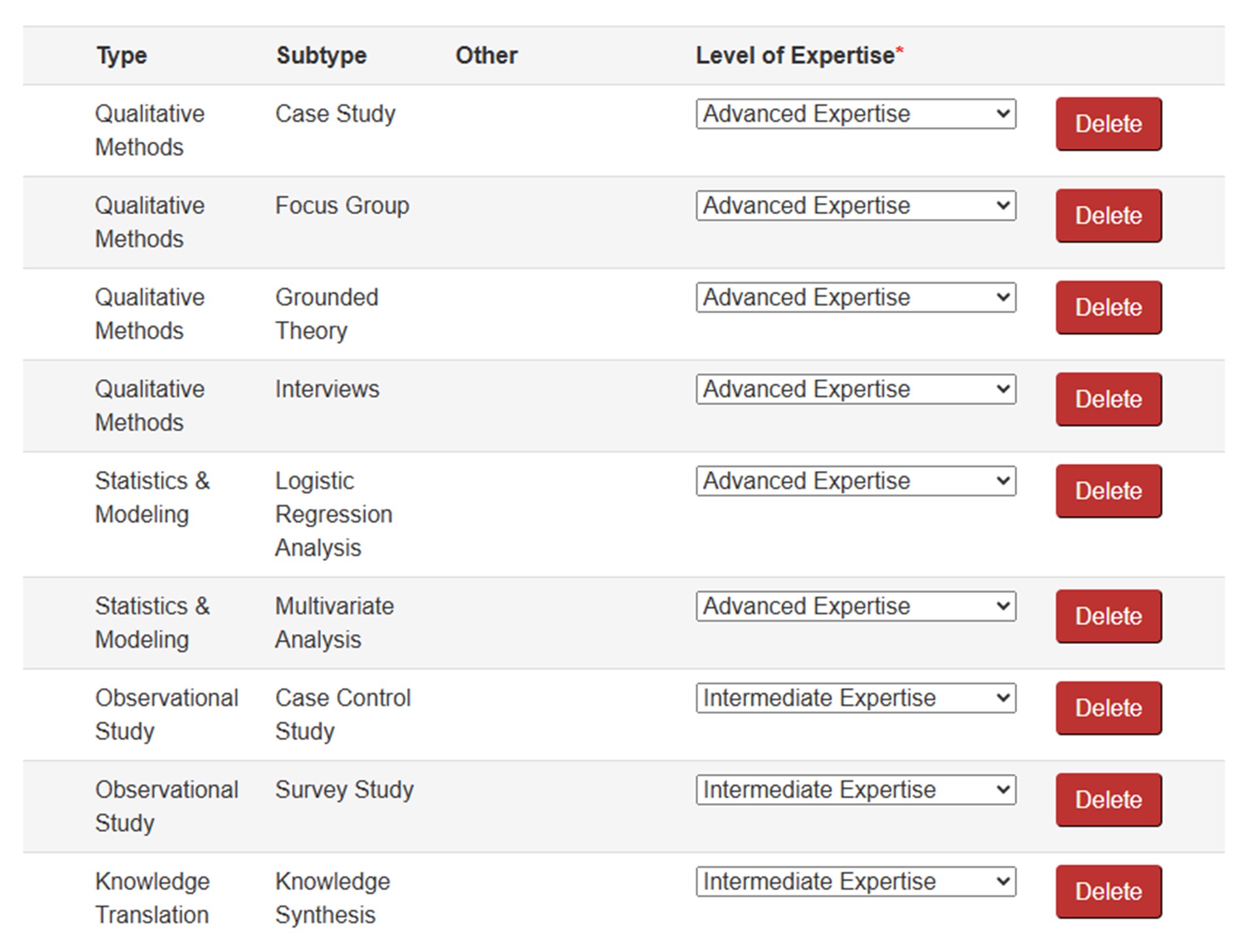
Methods/Approaches: I have Advanced expertise in Case Studies, Focus Groups, Grounded Theory, Interviews, Logistic Regression Analysis, and Multivariate Analysis. I have Intermediate expertise in Case Control Studies, Survey Studies, and Knowledge Synthesis.
Long description
The image shows a section of a form that lists multiple expertise entries with corresponding details. The layout is organized into four columns: Type, Subtype, Other, and Level of Expertise, followed by a Delete button for each row. Here are the entries:
Row 1
- Type: Qualitative Methods
- Subtype: Case Study
- Other: (blank)
- Level of Expertise: Advanced Expertise (selected from a dropdown menu)
Row 2
- Type: Qualitative Methods
- Subtype: Focus Group
- Other: (blank)
- Level of Expertise: Advanced Expertise (selected)
Row 3
- Type: Qualitative Methods
- Subtype: Grounded Theory
- Other: (blank)
- Level of Expertise: Advanced Expertise (selected)
Row 4
- Type: Qualitative Methods
- Subtype: Interviews
- Other: (blank)
- Level of Expertise: Advanced Expertise (selected)
Row 5
- Type: Statistics & Modeling
- Subtype: Logistic Regression Analysis
- Other: (blank)
- Level of Expertise: Advanced Expertise (selected)
Row 6
- Type: Statistics & Modeling
- Subtype: Multivariate Analysis
- Other: (blank)
- Level of Expertise: Advanced Expertise (selected)
Row 7
- Type: Observational Study
- Subtype: Case Control Study
- Other: (blank)
- Level of Expertise: Intermediate Expertise (selected)
Row 8
- Type: Observational Study
- Subtype: Survey Study
- Other: (blank)
- Level of Expertise: Intermediate Expertise (selected)
Row 9
- Type: Knowledge Translation
- Subtype: Knowledge Synthesis
- Other: (blank)
- Level of Expertise: Intermediate Expertise (selected)
Study Populations/Experimental Systems: I have Advanced expertise in Canada/National and Adolescents.
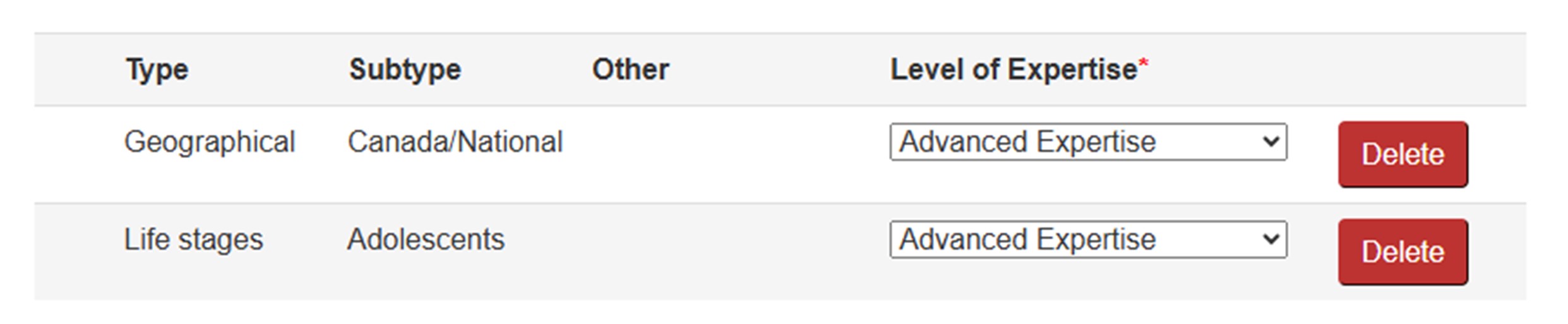
Long description
The image shows a section of a form that lists multiple expertise entries with corresponding details. The layout is organized into four columns: Type, Subtype, Other, and Level of Expertise, followed by a Delete button for each row. Here are the entries:
Row 1
- Type: Geographical
- Subtype: Canada/National
- Other: (blank)
- Level of Expertise: Advanced Expertise (selected from a dropdown menu)
Row 2
- Type: Life stages
- Subtype: Adolescents
- Other: (blank)
- Level of Expertise: Advanced Expertise (selected)
Committee Mandates: Public, Community and Population Health (PH1), and Knowledge Translation Research (KTR) best reflect my main areas of research.
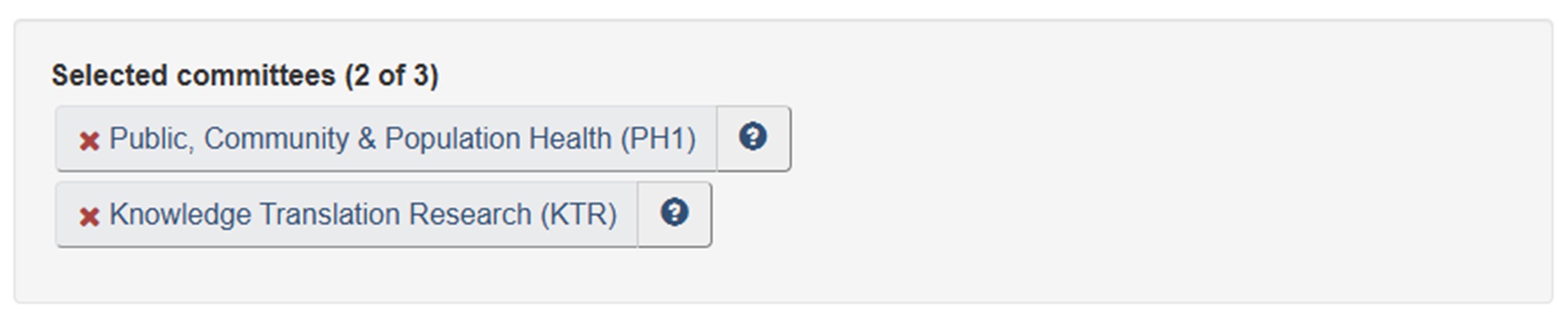
Long description
The image shows a section of a webpage titled "Selected committees (2 of 3)", indicating that two committees have been chosen. Below the heading, there are two rectangular buttons stacked vertically, each representing a selected committee. Each button has a light gray background and contains the committee name along with an abbreviation in parentheses. To the left of each committee name is a red "X" icon, which likely serves as a remove or delete option. To the right of each name is a small blue circular icon with a white question mark, suggesting that it provides additional information or help.
The two selected committees are:
- Public, Community & Population Health (PH1)
- Knowledge Translation Research (KTR)
Resources

Completing your Reviewer Profile (9 min.) Learning Module: The main focus of this module is how to complete Step 2: Expertise Overview and Step 3: Review my Profile. It also offers examples of completed Reviewer Profiles

How to Access the Reviewer Profile and College Profile on ResearchNet webpage: Visit this page for detailed instructions on how to access your Reviewer Profile on ResearchNet.
Knowledge Users
Knowledge Users
Knowledge Users include reviewers who are likely to be able to use knowledge generated through research to make informed decisions such as Health Care Practitioners, Health Care Administrators, Policy Makers, or Commercialization experts. Though patients, caregivers, and other citizen reviewer types can also be considered as knowledge users, if you are in this position, you will find more relevant guidance to completing your Reviewer Profile by clicking on the "Patient Reviewers" tab.
Most sections of the Reviewer Profile are applicable to knowledge users.
Step 1: Reviewer Overview
In this step, the following sections are required:
- Reviewer Type: This informs CIHR the viewpoint from which you are able and willing to review. Depending on peer review requirements, CIHR will engage with different types of reviewers. It is important that you select only the perspectives for which you have experience and expertise for peer review.
- Peer Review Language Ability: Identify in which languages (English or French) you can conduct reviews. As a peer reviewer, you will be assigned applications to review in the language(s) you select on your Profile. While you are required to understand the content of the application in your selected language(s), you may write your review in either official language.
As applicable, consider completing the following sections:
- First Independent Appointment
- Funding History
- Reviewer Activities
- Additional Information
Step 2: Expertise Overview
Though not required, we strongly encourage you to select one or more Areas of Science that are most relevant to your expertise and reviewer perspective as a Knowledge User. Identifying your Primary expertise in Research Themes and Areas of Science indicates to CIHR staff the areas of research where your role as a Knowledge User most directly influences the lifecycle of knowledge creation and application in health research.
If you require assistance identifying Research Themes or Areas of Science that are relevant to you, please contact us at college@cihr-irsc.gc.ca.
As applicable, please also complete the following sections:
Step 3: Review My Profile
In this step, you may see system warnings such as the ones listed on this image.

Long description
Based on the warnings below, CIHR many not be able to effectively match you to relevant applications. However, if you are satisfied with the information you have provided, no further action is required.
Thank you. Your information has been received.
- No Themes have been identified.
- No Areas of Science have been identified.
- No Methods/Approaches have been identified.
- No Study Populations/Experimental Systems have been identified.
- No committee mandate alignment has been identified.
Clicking on a warning will bring you to that section and allow you to update your information. Simply disregard warnings for any sections you intentionally skipped. Rest assured these warnings will not affect your saved information.
Reviewer Profile Example
Knowledge User Example
Background: I am a Health Care Practitioner and Health Care Administrator working in a hospital. I participate in research projects and use knowledge generated through research to make informed decisions about my programs and practices.
Note: As a knowledge user, I will only select items that I'm willing and comfortable to review. I'm not required to select an item on each page, though it is encouraged.
Theme: My primary theme is Health Systems and Services.
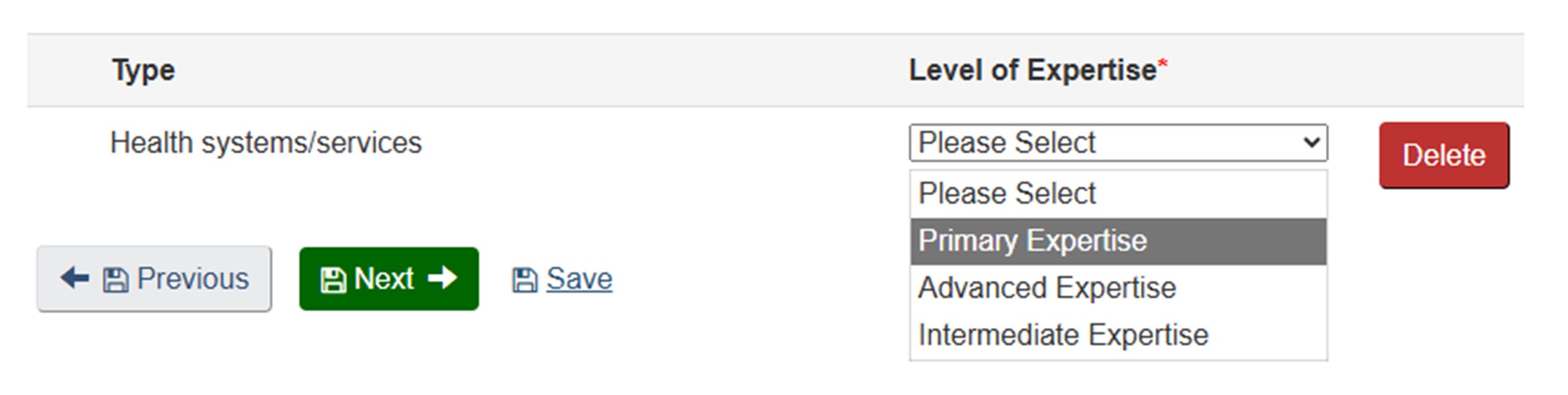
Long description
The image shows a section of a web form related to expertise selection. At the top, there is a table with two columns labeled:
- Type
- Level of Expertise* (with an asterisk indicating a required field)
Under the Type column, the words Health systems/services are displayed. Under the Level of Expertise column, there is a dropdown menu currently expanded, showing the following options:
- Please Select
- Primary Expertise (highlighted in gray)
- Advanced Expertise
- Intermediate Expertise
To the right of the dropdown menu, there is a red rectangular button labeled Delete.
Below the table, there are three navigation and action buttons:
- A gray button labeled Previous with a left arrow icon.
- A green button labeled Next with a right arrow icon.
- A blue text link labeled Save.
Institute: As a practitioner and administrator, my expertise aligns best with the Institute of Aging and the Institute of Health Services and Policy Research.
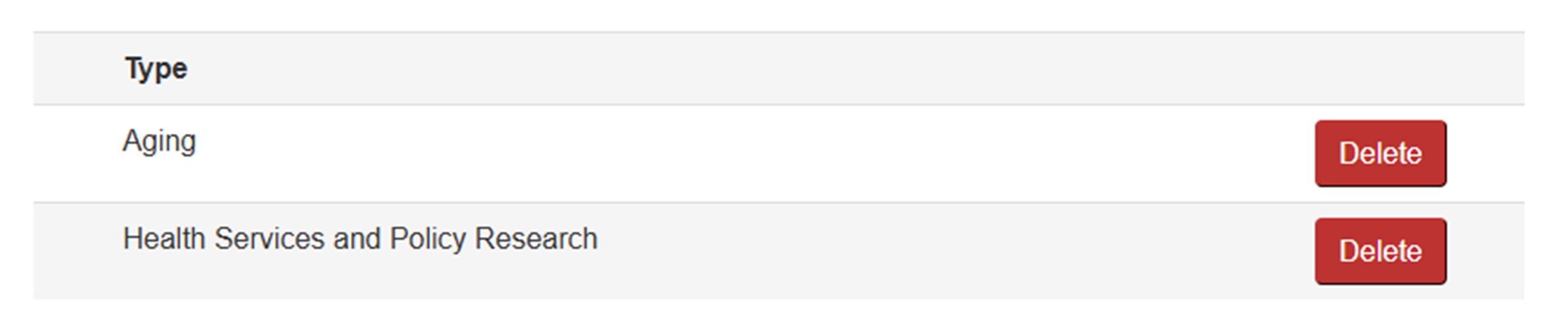
Long description
The image shows a section of a form listing selected expertise types. The layout consists of two rows under the heading "Type", each representing a specific research area:
- Aging
- Health Services and Policy Research
To the right of each entry, there is a red "Delete" button.
Area of Science: My Primary Area of Science is Geriatric Medicine and Health Sciences because it aligns best with my experience as a practitioner. I have Advanced expertise in selected Healthcare Effectiveness and Outcomes, and Healthcare Safety and Quality Improvement.
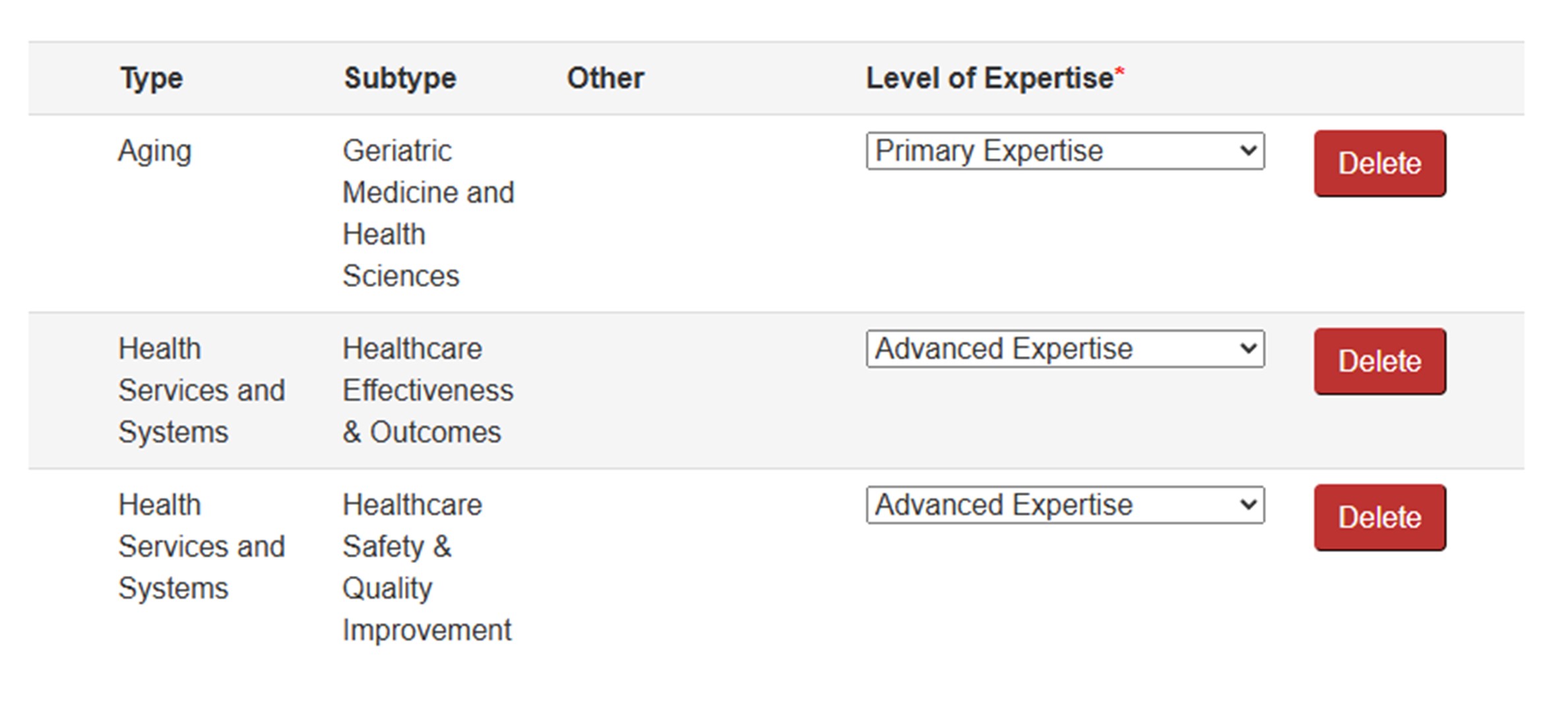
Long description
The image shows a section of a form that lists multiple expertise entries with corresponding details. The layout is organized into four columns: Type, Subtype, Other, and Level of Expertise, followed by a Delete button for each row. Here are the entries:
Row 1
- Type: Aging
- Subtype: Geriatric Medicine and Health Sciences
- Other: (blank)
- Level of Expertise: Primary Expertise (selected from a dropdown menu)
Row 2
- Type: Health Services and Systems
- Subtype: Healthcare Effectiveness & Outcomes
- Other: (blank)
- Level of Expertise: Advanced Expertise (selected)
Row 3
- Type: Health Services and Systems
- Subtype: Healthcare Safety & Quality Improvement
- Other: (blank)
- Level of Expertise: Advanced Expertise (selected)
Methods/Approaches: I have Advanced expertise in Health Services Research and Program Evaluation. I have Intermediate expertise in Clinical Research.
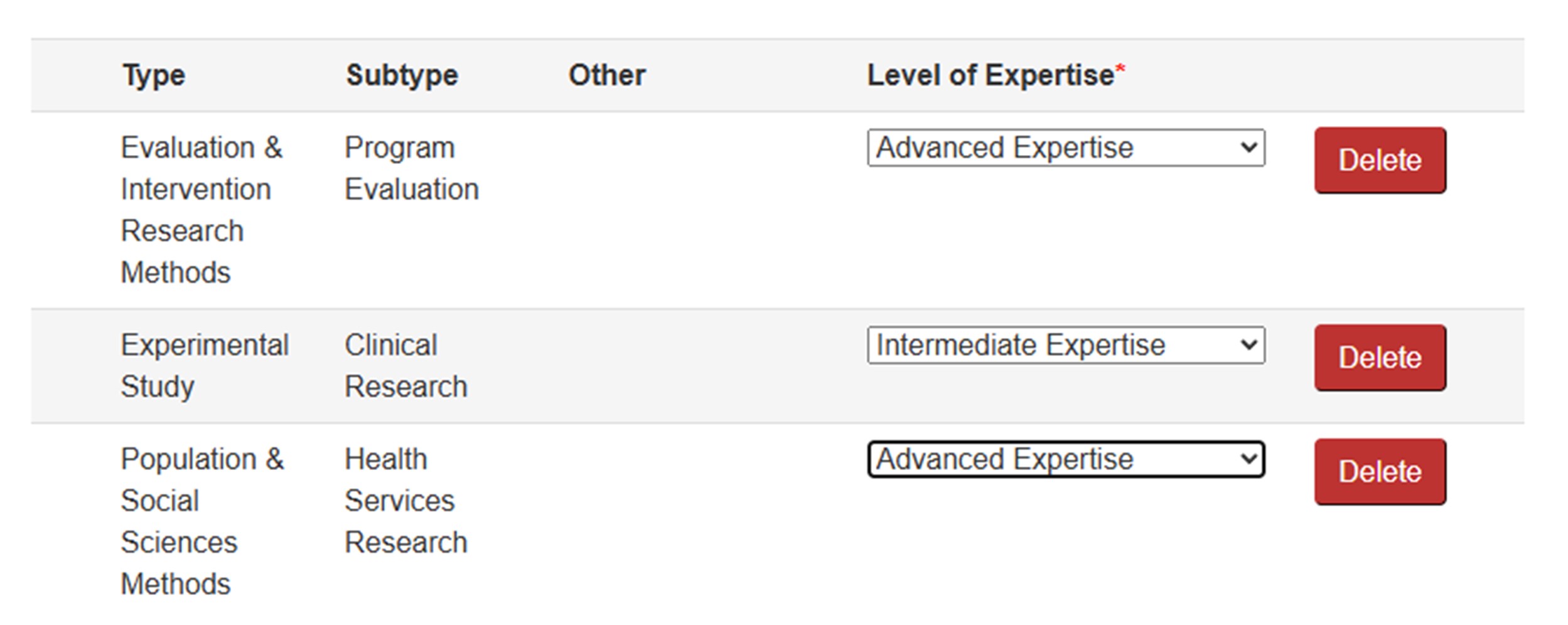
Long description
The image shows a section of a form that lists multiple expertise entries with corresponding details. The layout is organized into four columns: Type, Subtype, Other, and Level of Expertise, followed by a Delete button for each row. Here are the entries:
Row 1
- Type: Evaluation & Intervention Research Methods
- Subtype: Program Evaluation
- Other: (blank)
- Level of Expertise: Advanced Expertise (selected from a dropdown menu)
Row 2
- Type: Experimental Study
- Subtype: Clinical Research
- Other: (blank)
- Level of Expertise: Intermediate Expertise (selected)
Row 3
- Type: Population & Social Sciences Methods
- Subtype: Health Services Research
- Other: (blank)
- Level of Expertise: Advanced Expertise (selected)
Study Populations/Experimental Systems: I have Advanced expertise in Older Adults, People with Disabilities and People with Diseases and Conditions.
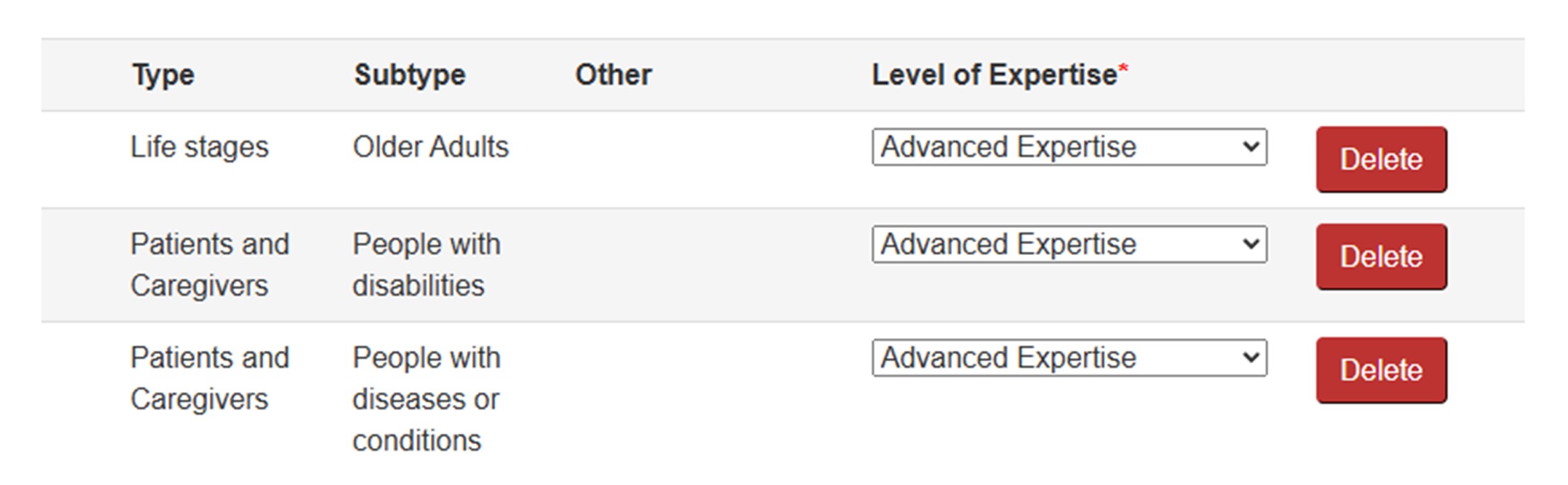
Long description
The image shows a section of a form that lists multiple expertise entries with corresponding details. The layout is organized into four columns: Type, Subtype, Other, and Level of Expertise, followed by a Delete button for each row. Here are the entries:
Row 1
- Type: Life stages
- Subtype: Older Adults
- Other: (blank)
- Level of Expertise: Advanced Expertise (selected from a dropdown menu)
Row 2
- Type: Patients and Caregivers
- Subtype: People with disabilities
- Other: (blank)
- Level of Expertise: Advanced Expertise (selected)
Row 3
- Type: Patients and Caregivers
- Subtype: People with diseases or conditions
- Other: (blank)
- Level of Expertise: Advanced Expertise (selected)
Committee Mandates: Social Dimensions in Aging (SDA) and Health Services Evaluation & Interventions Research (HS1) best reflect my areas of research.
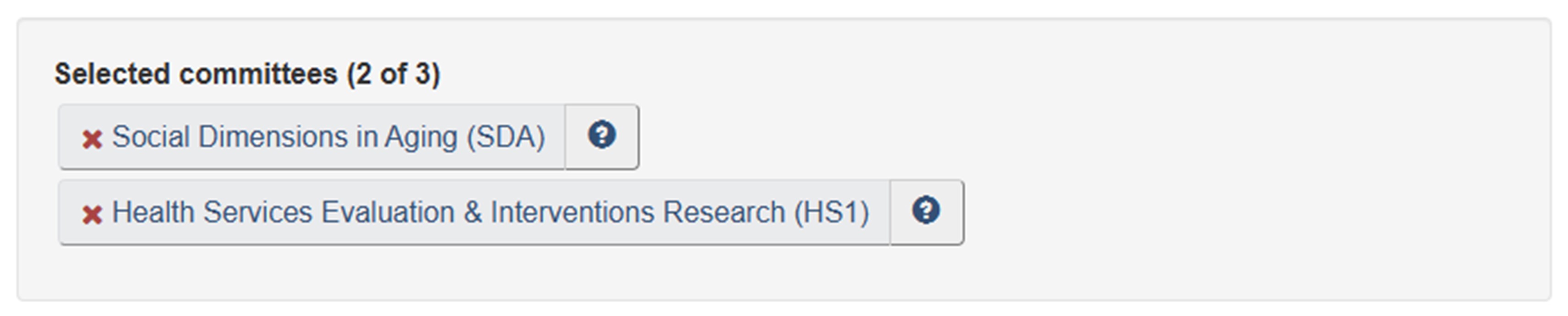
Long description
The image shows a section of a webpage titled "Selected committees (2 of 3)", indicating that two committees have been chosen. Below the heading, there are two rectangular buttons stacked vertically, each representing a selected committee. Each button has a light gray background and contains the committee name along with an abbreviation in parentheses. To the left of each committee name is a red "X" icon, which likely serves as a remove or delete option. To the right of each name is a small blue circular icon with a white question mark, suggesting that it provides additional information or help.
The two selected committees are:
- Social Dimensions in Aging (SDA)
- Health Services Evaluation & Interventions Research (HS1)
Note: Warning messages will show in Step 3: Review My Profile if any Expertise Overview sections are skipped. No further action is needed.
Resources
Completing your Reviewer Profile (9 min.) Learning Module: The main focus of this module is how to complete Step 2: Expertise Overview and Step 3: Review my Profile. It also offers examples of completed Reviewer Profiles

Peer Review for Knowledge Users (20 min.) Learning Module: This module explains who is a Knowledge User, their role in health research, and how they contribute to peer review at CIHR. Learning and Understanding more about your reviewer role will assist you in completing your Reviewer Profile.
How to Access the Reviewer Profile and College Profile on ResearchNet webpage: Visit this page for detailed instructions on how to access your Reviewer Profile on ResearchNet.
Patient Reviewers
Patient Reviewers
Patient is an overarching term inclusive of individuals with personal experience of a health issue, including consumers of health services, people with lived experience, caregivers, and advocates.
When completing the Reviewer Profile, consider your lived experience and the health issues which you are comfortable reviewing (e.g., condition, illness, treatments, and/or aspect of the health care system). This, and other information assists CIHR in matching your personal experience to review opportunities as they arise. While CIHR recognizes all perspectives you have experienced across health research and the health care continuum, for the Reviewer Profile, please identify only viewpoint(s) from which you are both able and willing to review.
General Instructions
- As you navigate your Reviewer Profile, carefully read the instructions to help you decide whether to complete or skip a section.
- You may skip sections that are not required; however, we encourage you to explore your profile as many sections may support your engagement in review, such as Areas of Science.
- If you skipped a section, the system may prompt you to revisit that section. Please do not feel obligated to select anything outside of what you are able and willing to review.
- Rest assured that the information you entered will be saved – you will receive system warnings for sections, which are marked with a red asterisk (*). This is only meant to highlight that you have not completed these sections. Unless indicated as required below, you may decide to skip them or complete them later.
Step 1: Reviewer Overview
In this step, the following sections are required:
- Reviewer Type: This informs CIHR the viewpoint from which you are able and willing to review. Depending on peer review requirements, CIHR will engage with different types of reviewers. It is important that you select the perspectives for which you have experience and expertise for peer review.
- Peer Review Language Ability: Identify in which languages (English or French) you can conduct reviews. As a peer reviewer, you will be assigned applications to review in the language(s) you select on your Profile. While you are required to understand the content of the application in your selected language(s), you may write your review in either official language.
As applicable, consider completing the following sections:
- First Independent Appointment
- Funding History
- Reviewer Activities
- Additional Information
Step 2: Expertise Overview
Though not required, we strongly encourage you to select one or more Areas of Science that are most relevant to your lived experience and patient reviewer perspective. Identify your level of expertise as "Primary" for the selection that is most central to your experience.
If you require assistance identifying Areas of Science that are relevant to you, please contact us at college@cihr-irsc.gc.ca.
As applicable, please also complete the following sections:
- Themes
- Suggested Institutes
- Methods/Approaches
- Study Populations and Experimental Systems
- Committee Mandates
As a patient reviewer, we acknowledge the importance of your lived experience to assist us in matching your personal experience to review opportunities. Please contact us to briefly describe the health issue(s) that you are comfortable reviewing (e.g., condition, illness, treatments, and/or aspect of the health care system) and we will make note of this important information.
Step 3: Review My Profile
In this step, you may see system warnings such as the ones listed on this image.

Long description
Based on the warnings below, CIHR many not be able to effectively match you to relevant applications. However, if you are satisfied with the information you have provided, no further action is required.
Thank you. Your information has been received.
- No Themes have been identified.
- No Areas of Science have been identified.
- No Methods/Approaches have been identified.
- No Study Populations/Experimental Systems have been identified.
- No committee mandate alignment has been identified.
Clicking on a warning will bring you to that section and allow you to update your information. Simply disregard warnings for any sections you intentionally skipped. Rest assured these warnings will not affect your saved information.
Reviewer Profile Example
Background: I am a Patient and Patient Advocate, a cancer survivor with extensive experience navigating the healthcare system, committed to supporting cancer patients across Canada.
Step 1: Reviewer Overview
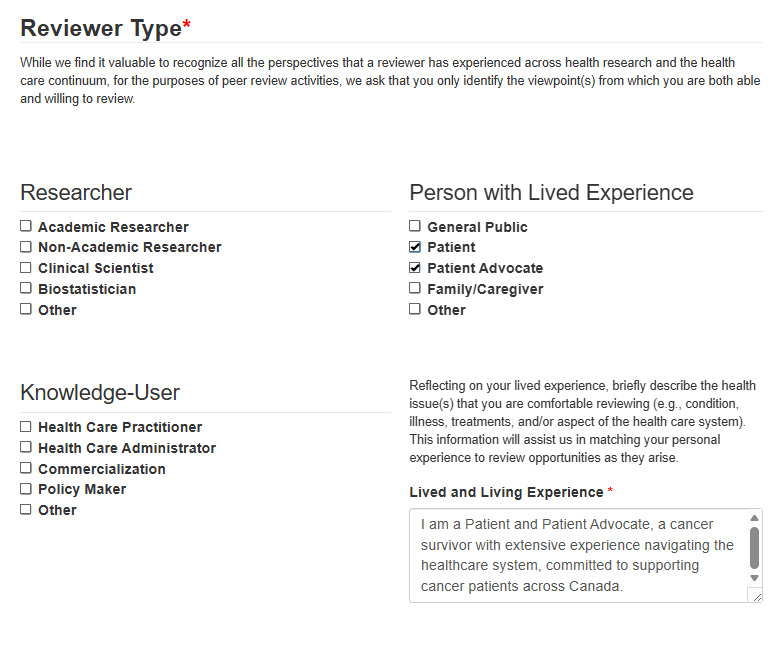
My reviewer type, the perspective I bring to peer review, is as a Patient and Patient Advocate. As a result, I'm prompted to elaborate on my lived and living experience. As a person with lived and living experience, I described only the health conditions, illnesses, treatments, and aspects of the health system that I'm willing and comfortable to review such as cancer treatments, being a cancer survivor, and access to care in the Canadian health care system.
Long description
The image shows a section of a form titled "Reviewer Type" with a red asterisk indicating it is a required field. Below the title, there is an explanatory paragraph stating:
"While we find it valuable to recognize all the perspectives that a reviewer has experienced across health research and the health care continuum, for the purposes of peer review activities, we ask that you only identify the viewpoint(s) from which you are both able and willing to review."
The form is divided into three main categories:
-
Researcher
Options listed with checkboxes:
- Academic Researcher
- Non-Academic Researcher
- Clinical Scientist
- Biostatistician
- Other
-
Person with Lived Experience
Options listed with checkboxes:
- General Public
- Patient (checked)
- Patient Advocate (checked)
- Family/Caregiver
- Other
-
Knowledge-User
Options listed with checkboxes:
- Health Care Practitioner
- Health Care Administrator
- Commercialization
- Policy Maker
- Other
On the right side, there is a section asking the reviewer to reflect on their lived experience and briefly describe the health issue(s) they are comfortable reviewing. The text reads:
"Reflecting on your lived experience, briefly describe the health issue(s) that you are comfortable reviewing (e.g., condition, illness, treatments, and/or aspect of the health care system). This information will assist us in matching your personal experience to review opportunities as they arise."
Below this, there is a text box labeled "Lived and Living Experience" (also marked with a red asterisk as required). Inside the text box, the following description is written:
"I am a cancer survivor and have lots of experience with the difficulties patients face when accessing care. My journey led me to get involved in advocacy work with Canadian cancer organizations."
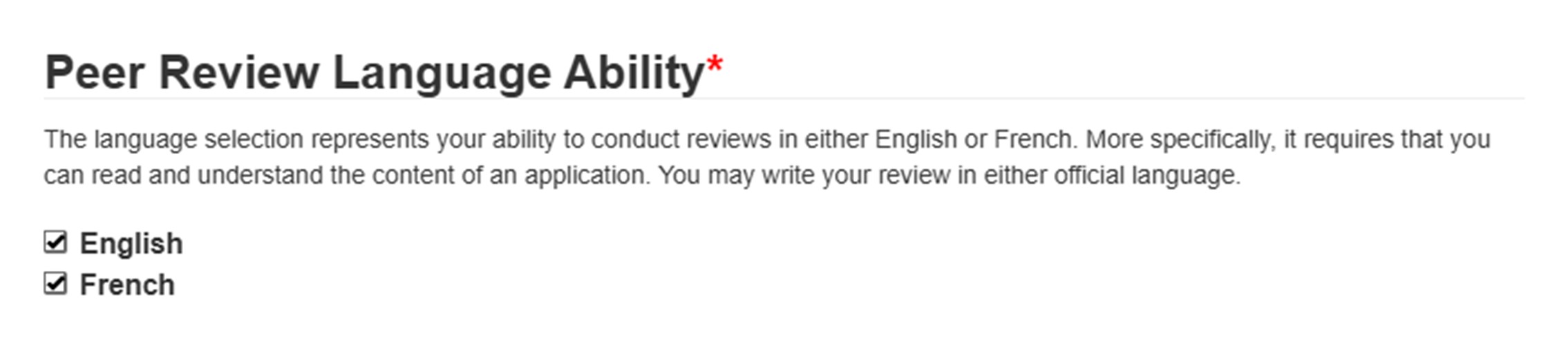
I acknowledge that I'm willing and comfortable to review applications submitted in English or French by completing the Peer Review Language Ability section.
Long description
The image displays a section of a form titled "Peer Review Language Ability" with a red asterisk indicating that this is a required field. Beneath the title, there is an explanatory paragraph that reads:
"The language selection represents your ability to conduct reviews in either English or French. More specifically, it requires that you can read and understand the content of an application. You may write your review in either official language."
Below this paragraph, there are two options presented as checkboxes:
- English (checked)
- French (checked)
The other sections in Step 1 don't apply to me, so I left them blank.
Note: As a patient reviewer, the lived and living experience I share in Step 1 is the most important part in helping match me with appropriate review opportunities. In Step 2, I can stop at any time or choose to continue and select additional items that I'm willing and comfortable reviewing. I can also reach out to CIHR for support in completing this section.
Step 2: Expertise Overview
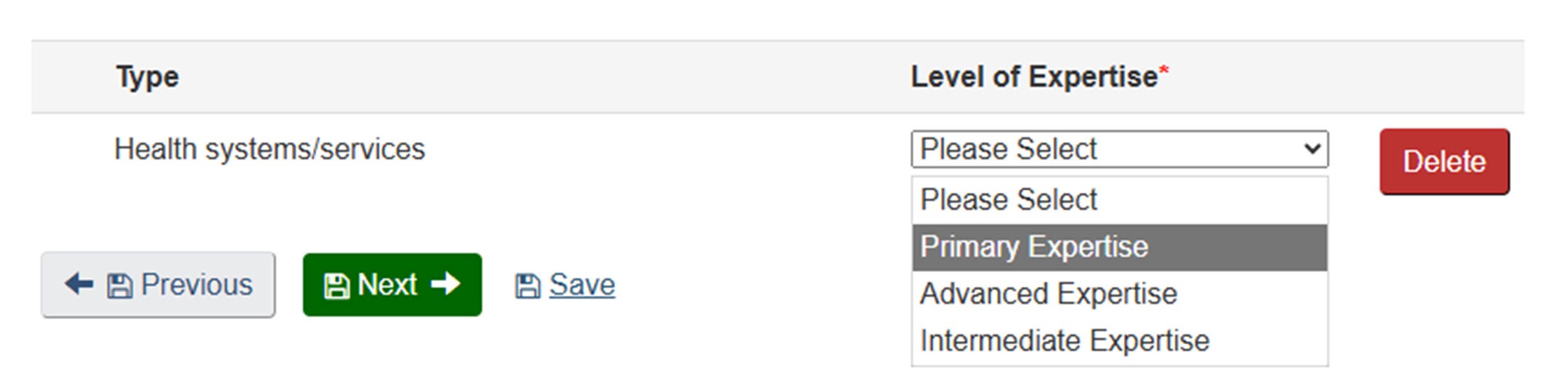
Theme: My primary theme is Health Systems and Services.
Long description
The image shows a section of a web form related to expertise selection. At the top, there is a table with two columns labeled:
- Type
- Level of Expertise* (with an asterisk indicating a required field)
Under the Type column, the words Health systems/services are displayed. Under the Level of Expertise column, there is a dropdown menu currently expanded, showing the following options:
- Please Select
- Primary Expertise (highlighted in gray)
- Advanced Expertise
- Intermediate Expertise
To the right of the dropdown menu, there is a red rectangular button labeled Delete.
Below the table, there are three navigation and action buttons:
- A gray button labeled Previous with a left arrow icon.
- A green button labeled Next with a right arrow icon.
- A blue text link labeled Save.
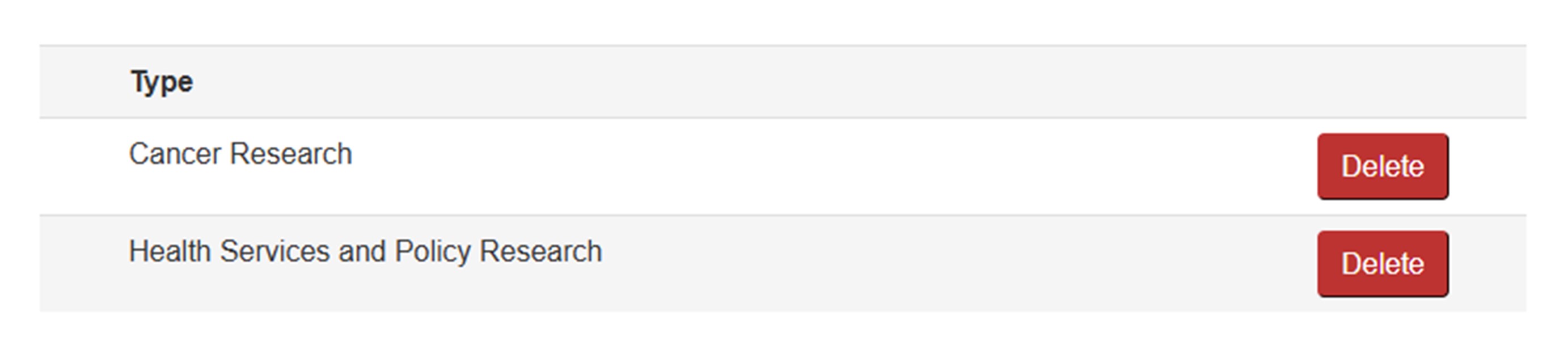
Institute: My expertise and experiences align best with the Institute of Cancer Research and the Institute of Health Services and Policy Research.
Long description
The image shows a section of a form listing selected expertise types. The layout consists of two rows under the heading "Type", each representing a specific research area:
- Cancer Research
- Health Services and Policy Research
To the right of each entry, there is a red "Delete" button.
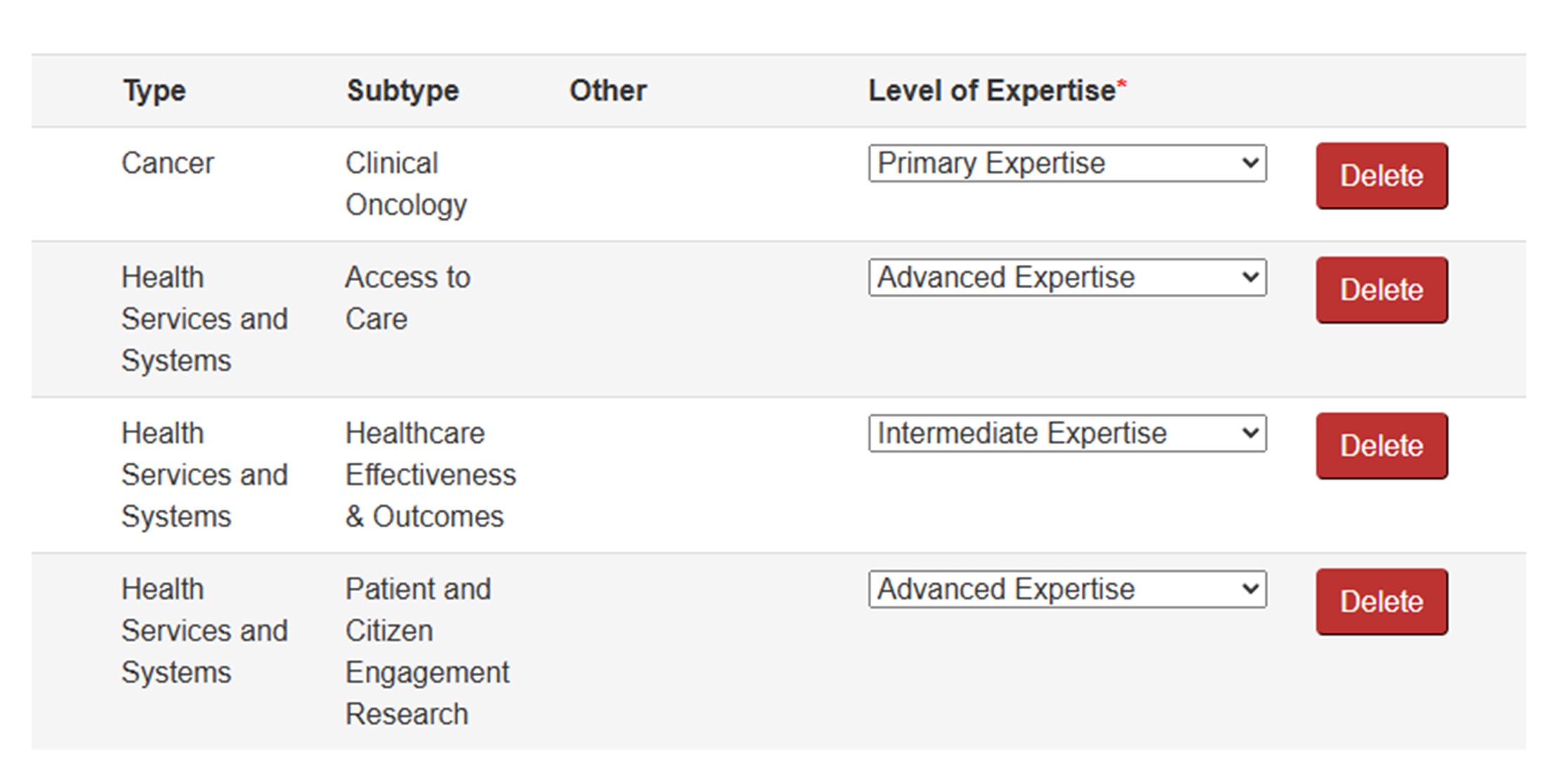
Area of Science: I have several Areas of Science that are closest to my lived and living experience, they are not perfect matches but are closest to what I am comfortable reviewing. My primary Area of Science is Clinical Oncology because of my experience with cancer treatment. I have Advanced expertise in Access to Care and Patient and Citizen Engagement Research, as these areas resonate strongly with my lived and living experience. Lastly, I have Intermediate expertise in Healthcare Effectiveness and Outcomes, recognizing that while I am comfortable reviewing applications about this, it is not my primary focus.
Long description
The image shows a section of a form that lists multiple expertise entries with corresponding details. The layout is organized into four columns: Type, Subtype, Other, and Level of Expertise, followed by a Delete button for each row. Here are the entries:
Row 1
- Type: Cancer
- Subtype: Clinical Oncology
- Other: (blank)
- Level of Expertise: Primary Expertise (selected from a dropdown menu)
Row 2
- Type: Health Services and Systems
- Subtype: Access to Care
- Other: (blank)
- Level of Expertise: Advanced Expertise (selected)
Row 3
- Type: Health Services and Systems
- Subtype: Healthcare Effectiveness & Outcomes
- Other: (blank)
- Level of Expertise: Intermediate Expertise (selected)
Row 4
- Type: Health Services and Systems
- Subtype: Patient and Citizen Engagement Research
- Other: (blank)
- Level of Expertise: Advanced Expertise (selected)
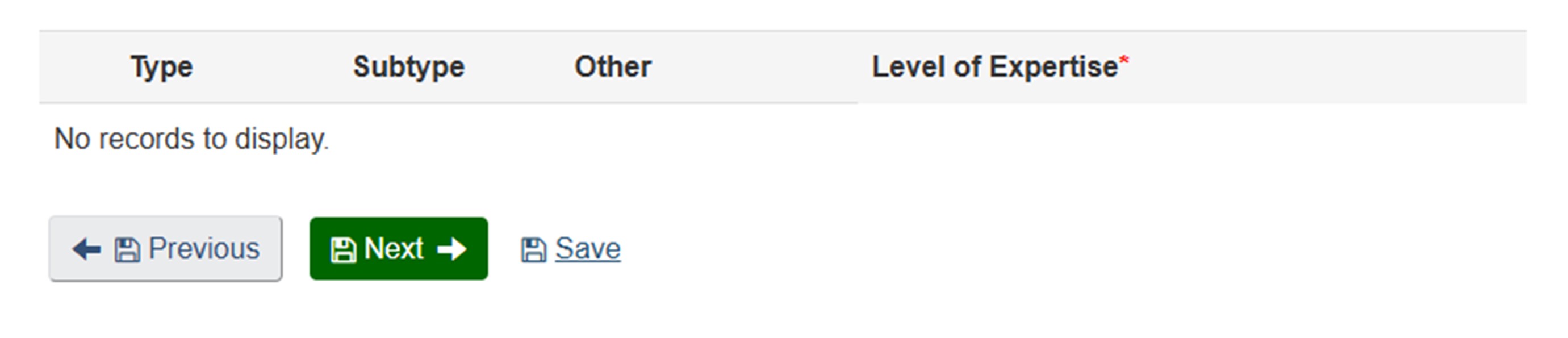
Methods/Approaches: I skip this section. My lived and living experience already covers this.
Long description
The image shows a section of a form designed to capture expertise details. The layout includes four column headers: Type, Subtype, Other, and Level of Expertise (marked with a red asterisk indicating it is a required field). Below these headers, the text "No records to display."
At the bottom of the section, there are three navigation options:
- Previous: A gray button with a left arrow icon.
- Next: A green button with a right arrow icon.
- Save: A blue hyperlink-style text option.
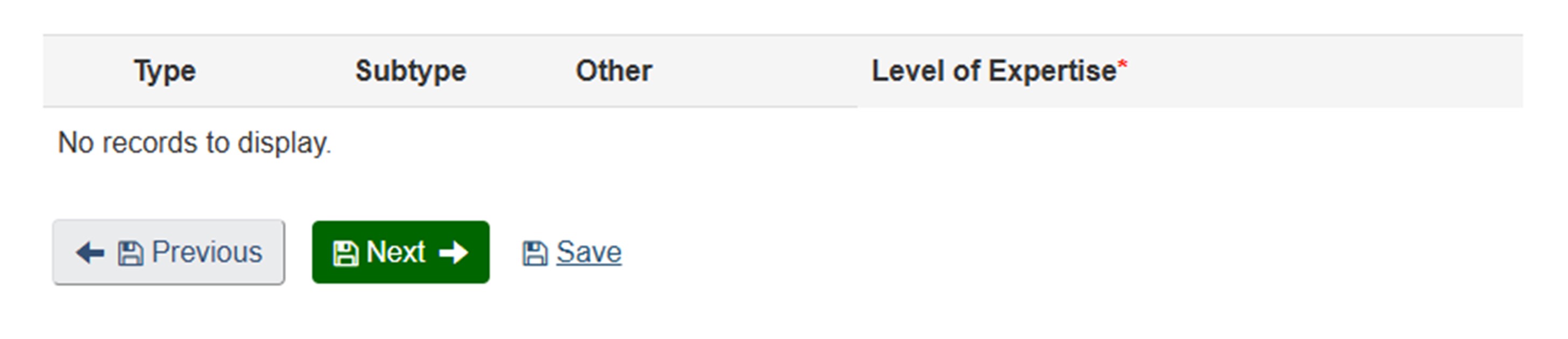
Study Populations/Experimental Systems: I skip this section. My lived and living experience already covers this.
Long description
The image shows a section of a form designed to capture expertise details. The layout includes four column headers: Type, Subtype, Other, and Level of Expertise (marked with a red asterisk indicating it is a required field). Below these headers, the text "No records to display."
At the bottom of the section, there are three navigation options:
- Previous: A gray button with a left arrow icon.
- Next: A green button with a right arrow icon.
- Save: A blue hyperlink-style text option.
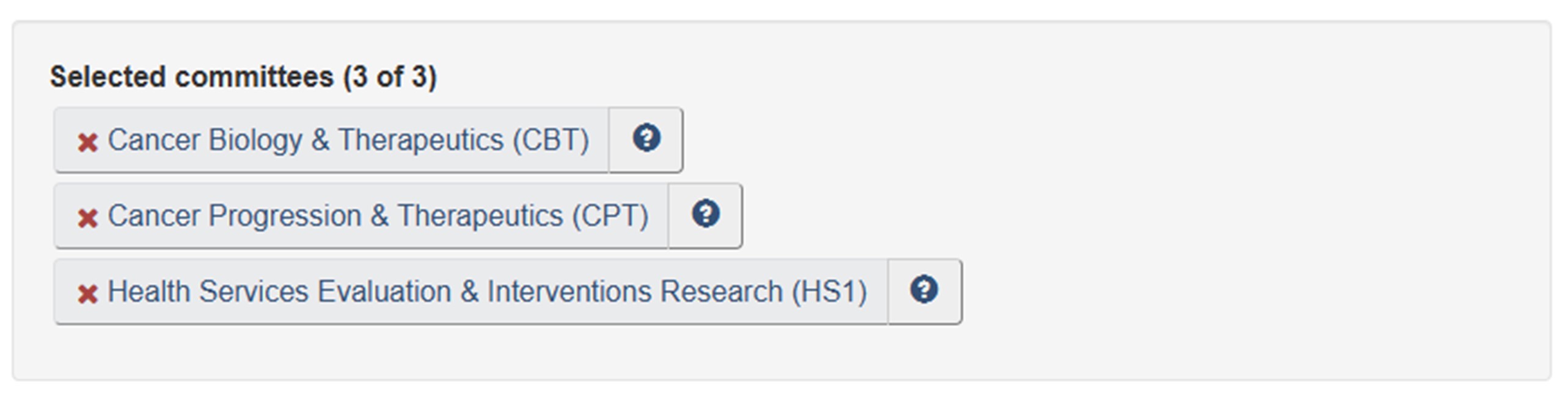
Committee Mandates: The committee mandates most relevant to me are Cancer Biology and Therapeutics (CBT), and Cancer Progression and Therapeutics (CPT) and Health Services Evaluation and Interventions Research (HS1).
Long description
The image shows a section of a webpage titled "Selected committees (3 of 3)", indicating that three committees have been chosen. Below the heading, there are three rectangular buttons stacked vertically, each representing a selected committee. Each button has a light gray background and contains the committee name along with an abbreviation in parentheses. To the left of each committee name is a red "X" icon, which likely serves as a remove or delete option. To the right of each name is a small blue circular icon with a white question mark, suggesting that it provides additional information or help.
The three selected committees are:
- Cancer Biology & Therapeutics (CBT)
- Cancer Progression & Therapeutics (CPT)
- Health Services Evaluation & Interventions Research (HS1)
Step 3: Review My Profile
I see warnings encouraging me to complete certain sections. Since I intentionally skipped these sections, I can disregard the warnings and complete my profile.
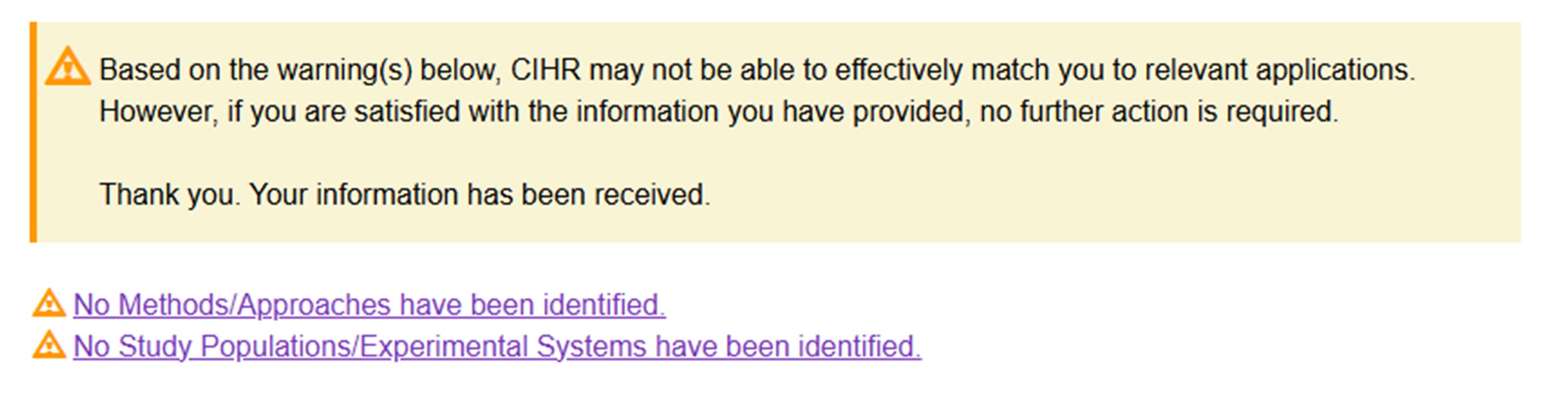
Long description
The image displays a warning message from CIHR regarding incomplete information in an application or profile. At the top, there is a yellow box with a triangular warning icon followed by the text:
"Based on the warning(s) below, CIHR may not be able to effectively match you to relevant applications. However, if you are satisfied with the information you have provided, no further action is required. Thank you. Your information has been received."
Below the yellow box, there are two separate warning lines, each preceded by a triangular warning icon:
- No Methods/Approaches have been identified. (This text is a clickable hyperlink in purple.)
- No Study Populations/Experimental Systems have been identified. (This text is also a clickable hyperlink in purple.)
Resources
Completing your Reviewer Profile (9 min.) Learning Module: The main focus of this module is how to complete Step 2: Expertise Overview and Step 3: Review my Profile. It also offers examples of completed Reviewer Profiles
Peer Review for Knowledge Users (20 min.) Learning Module: This module explains who is a Knowledge User, their role in health research, and how they contribute to peer review at CIHR. Learning and Understanding more about your reviewer role will assist you in completing your Reviewer Profile.
How to Access the Reviewer Profile and College Profile on ResearchNet webpage: Visit this page for detailed instructions on how to access your Reviewer Profile on ResearchNet.
- Date modified: